---
title: "Graphify and MemPalace: an agent needs a project map and a decision history, not 'memory'"
canonical: https://maxtokens.ai/posts/graphify-mempalace-agent-context/
date: 2026-06-15
tags: [agents, memory]
description: "A coding agent needs two things: Graphify maps the code and its connections, MemPalace keeps the decision history. Map, memory, and sources in one workflow."
---
Every new session with a coding agent starts with a little amnesia.
The agent can be fast, capable, and good with tools. But for the first few minutes it still behaves like someone dropped into a stranger's laptop: where is the project, which service handles auth, why are there two similar configs in the repo, which migration was already discussed, what must not be touched before release.
People usually give this one name: "memory". But two different problems hide underneath it.
The first is navigation. The agent needs a map of the workspace: files, functions, classes, SQL schemas, Terraform, docs, links between modules, and the places half the project passes through. Without that map it spends context on recon: `grep`, `find`, reading `README`, reading `package.json`, walking imports, random files, and one more grep.
The second is decision history. The agent needs to remember what already happened around the project: why one approach was chosen and another rejected, where an old bug was found, what the user asked not to repeat, which endpoint must not be touched before the release.
Graphify and MemPalace cover different sides of this problem.
Graphify gives the agent a map of code, documents, and infrastructure. MemPalace stores the history of conversations, decisions, and project preferences.
They don't compete. Graphify answers: "where is this and what is it connected to?" MemPalace answers: "what do we already know about it, and what have we already decided?"
Mix those questions and you get the usual mush of RAG, embeddings, summaries, and hope that `top-k` will sort it out by itself. It usually doesn't.
## Why "just RAG" is a poor fit for coding
For a text knowledge base, RAG looks natural: split documents into chunks, build embeddings, find similar fragments, and hand them to the model. For code, that's not enough.
In code, word similarity isn't the only thing that matters. Connections matter.
The question "how does auth work?" may lead to files containing `auth`, `login`, `token`, or `session`. But the working answer often lives in a chain: middleware checks a header, calls a service, the service reads config, config depends on env, and the refresh-token logic lives separately and breaks the whole picture.
Vector search finds similar spots, but it's worse at showing the path between them.
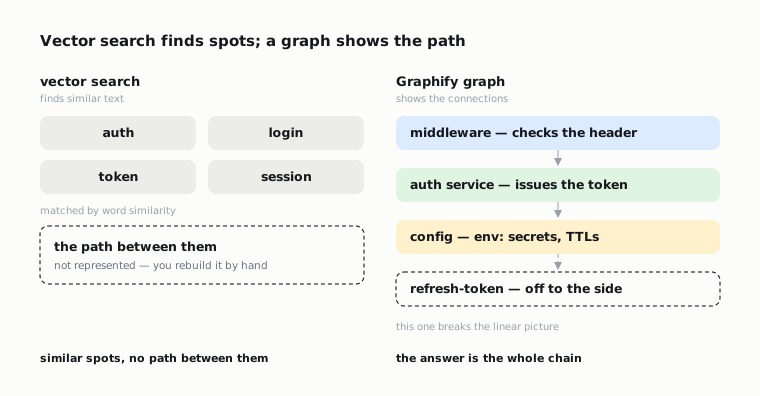 That's why a map layer appears around coding agents. Not "find similar text" but "show the structure": files, symbols, imports, calls, clusters, highly connected nodes, and unexpected intersections.
Graphify is exactly that layer. Not a replacement for memory, but navigation for the agent: where things are and what they connect to.
## What Graphify does
The project you want is `safishamsi/graphify`. The PyPI package is called `graphifyy`, but the command stays `graphify`.
Graphify takes a folder and builds a knowledge graph. The folder can hold code, SQL schemas, Terraform/HCL, shell scripts, Markdown, PDFs, Office files, Google Workspace shortcut files, images, video, audio, YouTube links, and MCP configs.
But internally, the input type matters.
Code is processed locally through tree-sitter. For code, Graphify doesn't have to send files to a model: it can deterministically pull the structure — functions, classes, imports, methods, links, and source locations.
Documents, PDFs, and images may need a model backend for semantic extraction. Video and audio can be transcribed locally through faster-whisper. So read the phrase "Graphify is local" carefully: the code layer is local, but different input types are handled differently.
The result goes into `graphify-out/`. The main artifacts:
- `graph.json` — the graph for queries and export;
- `GRAPH_REPORT.md` — a report with nodes, links, and questions;
- an HTML visualization;
- optionally a wiki, Obsidian export, GraphML, Neo4j/FalkorDB export, and an MCP server.
This is no longer "one more set of project docs" but an infrastructure layer the agent can query.
## How the Graphify pipeline is built
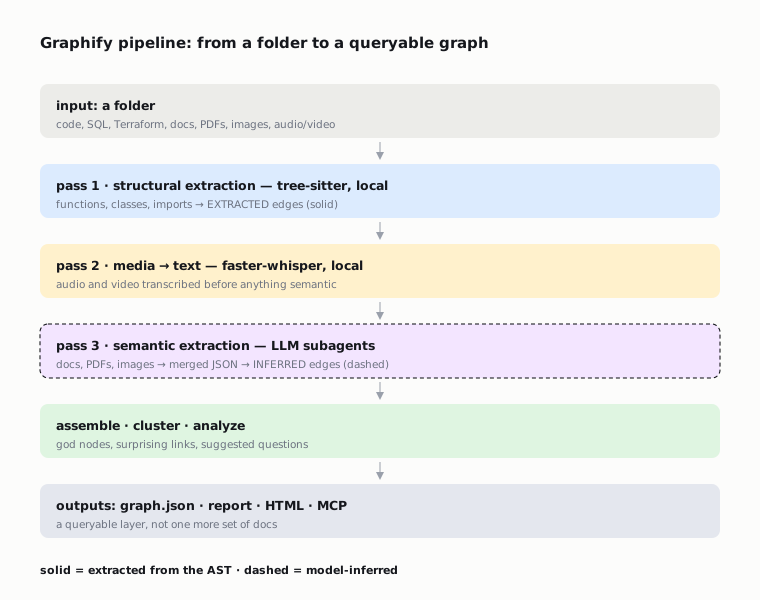
Graphify isn't just a single "index this folder" run. There are several passes inside.
The first pass is structural extraction. Tree-sitter parses the code and pulls out AST signals. That produces nodes and edges you can mark as `EXTRACTED`: a file contains a function, a class contains a method, a file imports a module, one symbol calls another.
The second pass is local processing of video and audio, if any. Media has to be turned into text first.
The third pass is semantic extraction from documents, PDFs, images, and other non-code sources. Here LLM calls become possible. Graphify can run parallel subagents over file chunks and then merge their JSON fragments into the shared graph.
After that come graph assembly, clustering, analysis, and output file generation.
Graphify's architecture docs describe the modules separately:
- `extract.py` extracts nodes and edges;
- `cluster.py` clusters the graph;
- `analyze.py` computes god nodes, surprising connections, and suggested questions;
- `cache.py` handles the semantic cache;
- `serve.py` runs the MCP server;
- `benchmark.py` compares reading the raw corpus with reading a subgraph.
An important detail: Graphify doesn't hide its confidence level. Edges can be `EXTRACTED`, `INFERRED`, or `AMBIGUOUS`. Doubtful links go to `AMBIGUOUS` and get flagged for manual review in the report.
It's not a perfect guarantee, but it's more honest than handing the agent a graph with no difference between "found in the AST" and "the model guessed".
For coding work this matters. The agent should treat a link found in the code differently from one the model guessed from documentation.
That's why a map layer appears around coding agents. Not "find similar text" but "show the structure": files, symbols, imports, calls, clusters, highly connected nodes, and unexpected intersections.
Graphify is exactly that layer. Not a replacement for memory, but navigation for the agent: where things are and what they connect to.
## What Graphify does
The project you want is `safishamsi/graphify`. The PyPI package is called `graphifyy`, but the command stays `graphify`.
Graphify takes a folder and builds a knowledge graph. The folder can hold code, SQL schemas, Terraform/HCL, shell scripts, Markdown, PDFs, Office files, Google Workspace shortcut files, images, video, audio, YouTube links, and MCP configs.
But internally, the input type matters.
Code is processed locally through tree-sitter. For code, Graphify doesn't have to send files to a model: it can deterministically pull the structure — functions, classes, imports, methods, links, and source locations.
Documents, PDFs, and images may need a model backend for semantic extraction. Video and audio can be transcribed locally through faster-whisper. So read the phrase "Graphify is local" carefully: the code layer is local, but different input types are handled differently.
The result goes into `graphify-out/`. The main artifacts:
- `graph.json` — the graph for queries and export;
- `GRAPH_REPORT.md` — a report with nodes, links, and questions;
- an HTML visualization;
- optionally a wiki, Obsidian export, GraphML, Neo4j/FalkorDB export, and an MCP server.
This is no longer "one more set of project docs" but an infrastructure layer the agent can query.
## How the Graphify pipeline is built
Graphify isn't just a single "index this folder" run. There are several passes inside.
The first pass is structural extraction. Tree-sitter parses the code and pulls out AST signals. That produces nodes and edges you can mark as `EXTRACTED`: a file contains a function, a class contains a method, a file imports a module, one symbol calls another.
The second pass is local processing of video and audio, if any. Media has to be turned into text first.
The third pass is semantic extraction from documents, PDFs, images, and other non-code sources. Here LLM calls become possible. Graphify can run parallel subagents over file chunks and then merge their JSON fragments into the shared graph.
After that come graph assembly, clustering, analysis, and output file generation.
Graphify's architecture docs describe the modules separately:
- `extract.py` extracts nodes and edges;
- `cluster.py` clusters the graph;
- `analyze.py` computes god nodes, surprising connections, and suggested questions;
- `cache.py` handles the semantic cache;
- `serve.py` runs the MCP server;
- `benchmark.py` compares reading the raw corpus with reading a subgraph.
An important detail: Graphify doesn't hide its confidence level. Edges can be `EXTRACTED`, `INFERRED`, or `AMBIGUOUS`. Doubtful links go to `AMBIGUOUS` and get flagged for manual review in the report.
It's not a perfect guarantee, but it's more honest than handing the agent a graph with no difference between "found in the AST" and "the model guessed".
For coding work this matters. The agent should treat a link found in the code differently from one the model guessed from documentation.
 ## Why a query in Graphify shouldn't be magical
One of the most useful details in Graphify is constrained query expansion.
Before traversal, the agent should expand the user's question only through the graph's own vocabulary. It shouldn't invent terms from its own memory. It reads labels from `graph.json`, builds a small dictionary, picks tokens that actually exist in the graph, and only then runs `graphify query`.
This is a good defense against the typical agent hallucination.
A bad agent gets the question "where's our authentication?" and starts looking for `authentication service`, even though in the project everything is called `auth`, `jwt`, `credentials`, and `session_middleware`. Or worse — it answers from general experience instead of from the actual project.
A good Graphify workflow forces it to adopt the project's vocabulary first.
An example command:
```bash
graphify query "auth token database" --budget 3000
```
But before that the agent should show which tokens it picked from the graph. If there are no relevant tokens, it should stop instead of pretending the corpus knows the answer.
It sounds minor, but normal agent discipline is built out of exactly these rules.
## Incremental update matters more than it seems
The first run of any indexer is the easy part. The real test starts in the second week.
Code changes. Files move. Refactoring deletes old symbols. Several developers commit in parallel. If the graph has to be rebuilt fully and by hand every time, people will stop updating it fast.
Graphify solves this with a manifest, a SHA256 cache, and incremental update.
The command:
```bash
graphify hook install
```
installs a post-commit hook. After a commit, the graph can update automatically. If only code files changed, Graphify can skip semantic extraction and run only the AST part. That's cheaper and faster.
There's an important engineering detail in the update process: on update you need to delete the old nodes for changed files before inserting new AST nodes. Otherwise dedup can collapse identically named symbols from different files.
In a changelog these things look boring, but they show the tool's maturity. Problems show up not on the happy path but when the graph lives longer than a single run.
Another example is a merge driver so `graph.json` doesn't get left with conflict markers after parallel commits. Same idea: the code graph becomes a team artifact. So it picks up the usual problems of team artifacts: merge, freshness, a corrupt manifest, stale nodes, ambiguous collisions.
That is the difference between a demo and a tool that can live inside a team workflow.
## MCP turns Graphify from a report into a working tool
Graphify can be used as a CLI, but the more interesting form is an MCP server.
Example:
```bash
python -m graphify.serve graphify-out/graph.json
python -m graphify.serve graphify-out/graph.json --transport http --port 8080
```
Through MCP the agent gets tools:
- `query_graph`;
- `get_node`;
- `get_neighbors`;
- `shortest_path`;
- `list_prs`;
- `get_pr_impact`;
- `triage_prs`.
This changes the workflow. The agent no longer asks a human to open the HTML report. It queries the graph itself during the task.
But MCP raises security questions. In `SECURITY.md` Graphify describes a basic model: the tool is local, MCP defaults to stdio, path traversal is restricted to `graphify-out/`, labels are sanitized, HTML escaping is in place, source files aren't executed, tree-sitter only parses the AST.
With HTTP transport there's a separate rule: don't expose it without `--api-key`. The README says it directly: if you bind to `0.0.0.0`, set an API key.
For team use I'd keep a simple principle: local stdio by default, HTTP only if there's a clear reason and access control.
## Where Graphify doesn't belong
Graphify shouldn't become a dump for everything.
If the project is small — six files and one folder — the value of the graph is more in visual clarity than in saving context. Graphify's own docs say it: token reduction is felt more on large corpora. A small project is usually something the agent can read in full anyway.
Graphify also doesn't replace architecture documentation. It can show links, but it won't explain the product reason a module is built that way. For that you need `CLAUDE.md`, ADRs, notes, issue history, or conversation memory.
One more thing: the graph can go stale. Any automatic context layer is dangerous if the agent starts trusting it more than the source files. The right discipline is this: Graphify points at where to look; the sources confirm what's actually there.
## MemPalace solves the other half of the problem
MemPalace starts not from a code map but from the loss of history.
Claude Code, Codex, OpenCode, and similar tools create a lot of valuable context in conversations: decisions, explanations, bugs found, preferences, deferred tasks, reasons for rejecting options. This information often doesn't make it into repo docs. It lives in local JSONL, in sessions, in the chat, and in the user's head.
MemPalace tries to turn that history into local, searchable memory.
MemPalace is built on verbatim first: store the original text first, not a summary. This matters because a summary almost always loses what turns out to be the key thing tomorrow: the wording of a prohibition, the strange detail of a bug, the exact file name, the tone of the user's decision.
The memory-palace model in MemPalace looks like this:
- wing — a project, a person, or an area;
- room — a topic inside a wing;
- hall — a memory type: facts, events, discoveries, preferences, advice;
- closet — a compact AAAK-compressed view over drawers, not a separate store;
- drawer — the original fragment of text.
The metaphor can sound decorative, but there's a sound engineering idea in it: metadata scoping. Searching across the whole history quickly turns into noise. Searching inside the right project and room gives the agent a chance not to pull up a coincidentally similar but irrelevant session.
## How MemPalace is built as a local layer
From the repo and `pyproject` you can see MemPalace is built around a CLI, an MCP server, and swappable backends.
Basic install:
```bash
uv tool install mempalace
mempalace init ~/projects/myapp
```
Usage examples:
```bash
mempalace mine ~/my-project
mempalace mine ~/.claude/projects/ --mode convos
mempalace search "why GraphQL"
mempalace wake-up
```
ChromaDB is used by default. There's a backend interface, `sqlite_exact`, Qdrant, Postgres + pgvector. In `base.py` you can see typed result dataclasses, contracts for backend/collection, a namespace isolation capability, and maintenance hooks like analyze/compact.
This is no longer "a search script over a folder" but an attempt at a swappable storage layer.
The MemPalace MCP server gives tools like:
- `mempalace_status`;
- `mempalace_list_wings`;
- `mempalace_list_rooms`;
- `mempalace_get_taxonomy`;
- `mempalace_search`;
- `mempalace_add_drawer`;
- `mempalace_delete_drawer`;
- `mempalace_reconnect`.
In the MCP server code you notice practical problems that rarely make it into marketing descriptions.
For example, stdout must contain only JSON-RPC, but dependencies like ChromaDB/onnxruntime can write banners and errors to stdout. MemPalace redirects stdout to stderr before the heavy imports so it doesn't break the client's JSON parser.
There's idle auto-exit for old MCP servers, especially because of Windows/HNSW file handles. There's a fallback to SQLite/BM25 if the Chroma/HNSW segment diverges from sqlite enough to become dangerous.
These are boring details. But they're exactly what shows that agent memory as a product comes down not to a pretty metaphor but to file handles, stdout, locking, fallback search, and repair paths.
## Hooks matter more than manual search
MemPalace becomes more useful when it's built into the agent's lifecycle.
The manual `mempalace search` command is good for checking. But if memory depends on whether the agent remembers to call it, the system will be leaky.
So plugins and hooks appear around MemPalace:
- Claude Code Stop and PreCompact hooks;
- an OpenCode plugin with wake-up injection, pre-compaction rescue, background mining, idle/crash auto-save;
- a Hermes plugin with prefetch on the user turn, a session-end diary, a pre-compression drawer, memory mirroring;
- Codex/Cursor/Antigravity plugin configs.
The right pattern is simple: memory should fire on session events.
Before work starts, the agent gets a wake-up context. Before compaction the system rescues important context. After the session ends it writes a diary or drawers. In the next session you can find it.
If you make the user copy results into memory by hand, it all falls apart by day three.
## MemPalace benchmarks should be read carefully
MemPalace claims strong retrieval numbers. The README has a headline: 96.6% R@5 raw on LongMemEval, zero API calls. The benchmark docs have reproducible commands for LongMemEval, LoCoMo, ConvoMem, and MemBench.
But R@5 isn't end-to-end answer quality. It means the right document or session landed in the top-5 retrieval results. A useful metric, but it doesn't prove that the agent will then answer correctly, line up the facts, and not confuse an old decision with a new one.
The project admits this too: comparing R@5 with the QA accuracy of other systems is incorrect.
And here it's worth being fully honest. The number was discussed publicly. 96.6% is ChromaDB vector search over verbatim text; the "palace" structure of wings/rooms doesn't participate in this benchmark as a separate algorithm. It works as metadata filtering — a standard technique for a vector DB.
After the discussion the project changed its tagline from "highest-scoring AI memory system ever benchmarked" to "best-benchmarked open-source". So the number can be honest in a narrow sense — as a published zero-API retrieval recall on LongMemEval — but it doesn't prove that the "palace" idea itself adds quality.
So the honest conclusion is this: MemPalace looks strong as a retrieval layer for old sessions, but production quality depends on how the agent uses the found fragment, how memory is filtered, how secrets are removed, how conflicts and staleness are resolved.
## The main boundary between Graphify and MemPalace
Graphify works with the workspace. MemPalace works with the history of the work.
## Why a query in Graphify shouldn't be magical
One of the most useful details in Graphify is constrained query expansion.
Before traversal, the agent should expand the user's question only through the graph's own vocabulary. It shouldn't invent terms from its own memory. It reads labels from `graph.json`, builds a small dictionary, picks tokens that actually exist in the graph, and only then runs `graphify query`.
This is a good defense against the typical agent hallucination.
A bad agent gets the question "where's our authentication?" and starts looking for `authentication service`, even though in the project everything is called `auth`, `jwt`, `credentials`, and `session_middleware`. Or worse — it answers from general experience instead of from the actual project.
A good Graphify workflow forces it to adopt the project's vocabulary first.
An example command:
```bash
graphify query "auth token database" --budget 3000
```
But before that the agent should show which tokens it picked from the graph. If there are no relevant tokens, it should stop instead of pretending the corpus knows the answer.
It sounds minor, but normal agent discipline is built out of exactly these rules.
## Incremental update matters more than it seems
The first run of any indexer is the easy part. The real test starts in the second week.
Code changes. Files move. Refactoring deletes old symbols. Several developers commit in parallel. If the graph has to be rebuilt fully and by hand every time, people will stop updating it fast.
Graphify solves this with a manifest, a SHA256 cache, and incremental update.
The command:
```bash
graphify hook install
```
installs a post-commit hook. After a commit, the graph can update automatically. If only code files changed, Graphify can skip semantic extraction and run only the AST part. That's cheaper and faster.
There's an important engineering detail in the update process: on update you need to delete the old nodes for changed files before inserting new AST nodes. Otherwise dedup can collapse identically named symbols from different files.
In a changelog these things look boring, but they show the tool's maturity. Problems show up not on the happy path but when the graph lives longer than a single run.
Another example is a merge driver so `graph.json` doesn't get left with conflict markers after parallel commits. Same idea: the code graph becomes a team artifact. So it picks up the usual problems of team artifacts: merge, freshness, a corrupt manifest, stale nodes, ambiguous collisions.
That is the difference between a demo and a tool that can live inside a team workflow.
## MCP turns Graphify from a report into a working tool
Graphify can be used as a CLI, but the more interesting form is an MCP server.
Example:
```bash
python -m graphify.serve graphify-out/graph.json
python -m graphify.serve graphify-out/graph.json --transport http --port 8080
```
Through MCP the agent gets tools:
- `query_graph`;
- `get_node`;
- `get_neighbors`;
- `shortest_path`;
- `list_prs`;
- `get_pr_impact`;
- `triage_prs`.
This changes the workflow. The agent no longer asks a human to open the HTML report. It queries the graph itself during the task.
But MCP raises security questions. In `SECURITY.md` Graphify describes a basic model: the tool is local, MCP defaults to stdio, path traversal is restricted to `graphify-out/`, labels are sanitized, HTML escaping is in place, source files aren't executed, tree-sitter only parses the AST.
With HTTP transport there's a separate rule: don't expose it without `--api-key`. The README says it directly: if you bind to `0.0.0.0`, set an API key.
For team use I'd keep a simple principle: local stdio by default, HTTP only if there's a clear reason and access control.
## Where Graphify doesn't belong
Graphify shouldn't become a dump for everything.
If the project is small — six files and one folder — the value of the graph is more in visual clarity than in saving context. Graphify's own docs say it: token reduction is felt more on large corpora. A small project is usually something the agent can read in full anyway.
Graphify also doesn't replace architecture documentation. It can show links, but it won't explain the product reason a module is built that way. For that you need `CLAUDE.md`, ADRs, notes, issue history, or conversation memory.
One more thing: the graph can go stale. Any automatic context layer is dangerous if the agent starts trusting it more than the source files. The right discipline is this: Graphify points at where to look; the sources confirm what's actually there.
## MemPalace solves the other half of the problem
MemPalace starts not from a code map but from the loss of history.
Claude Code, Codex, OpenCode, and similar tools create a lot of valuable context in conversations: decisions, explanations, bugs found, preferences, deferred tasks, reasons for rejecting options. This information often doesn't make it into repo docs. It lives in local JSONL, in sessions, in the chat, and in the user's head.
MemPalace tries to turn that history into local, searchable memory.
MemPalace is built on verbatim first: store the original text first, not a summary. This matters because a summary almost always loses what turns out to be the key thing tomorrow: the wording of a prohibition, the strange detail of a bug, the exact file name, the tone of the user's decision.
The memory-palace model in MemPalace looks like this:
- wing — a project, a person, or an area;
- room — a topic inside a wing;
- hall — a memory type: facts, events, discoveries, preferences, advice;
- closet — a compact AAAK-compressed view over drawers, not a separate store;
- drawer — the original fragment of text.
The metaphor can sound decorative, but there's a sound engineering idea in it: metadata scoping. Searching across the whole history quickly turns into noise. Searching inside the right project and room gives the agent a chance not to pull up a coincidentally similar but irrelevant session.
## How MemPalace is built as a local layer
From the repo and `pyproject` you can see MemPalace is built around a CLI, an MCP server, and swappable backends.
Basic install:
```bash
uv tool install mempalace
mempalace init ~/projects/myapp
```
Usage examples:
```bash
mempalace mine ~/my-project
mempalace mine ~/.claude/projects/ --mode convos
mempalace search "why GraphQL"
mempalace wake-up
```
ChromaDB is used by default. There's a backend interface, `sqlite_exact`, Qdrant, Postgres + pgvector. In `base.py` you can see typed result dataclasses, contracts for backend/collection, a namespace isolation capability, and maintenance hooks like analyze/compact.
This is no longer "a search script over a folder" but an attempt at a swappable storage layer.
The MemPalace MCP server gives tools like:
- `mempalace_status`;
- `mempalace_list_wings`;
- `mempalace_list_rooms`;
- `mempalace_get_taxonomy`;
- `mempalace_search`;
- `mempalace_add_drawer`;
- `mempalace_delete_drawer`;
- `mempalace_reconnect`.
In the MCP server code you notice practical problems that rarely make it into marketing descriptions.
For example, stdout must contain only JSON-RPC, but dependencies like ChromaDB/onnxruntime can write banners and errors to stdout. MemPalace redirects stdout to stderr before the heavy imports so it doesn't break the client's JSON parser.
There's idle auto-exit for old MCP servers, especially because of Windows/HNSW file handles. There's a fallback to SQLite/BM25 if the Chroma/HNSW segment diverges from sqlite enough to become dangerous.
These are boring details. But they're exactly what shows that agent memory as a product comes down not to a pretty metaphor but to file handles, stdout, locking, fallback search, and repair paths.
## Hooks matter more than manual search
MemPalace becomes more useful when it's built into the agent's lifecycle.
The manual `mempalace search` command is good for checking. But if memory depends on whether the agent remembers to call it, the system will be leaky.
So plugins and hooks appear around MemPalace:
- Claude Code Stop and PreCompact hooks;
- an OpenCode plugin with wake-up injection, pre-compaction rescue, background mining, idle/crash auto-save;
- a Hermes plugin with prefetch on the user turn, a session-end diary, a pre-compression drawer, memory mirroring;
- Codex/Cursor/Antigravity plugin configs.
The right pattern is simple: memory should fire on session events.
Before work starts, the agent gets a wake-up context. Before compaction the system rescues important context. After the session ends it writes a diary or drawers. In the next session you can find it.
If you make the user copy results into memory by hand, it all falls apart by day three.
## MemPalace benchmarks should be read carefully
MemPalace claims strong retrieval numbers. The README has a headline: 96.6% R@5 raw on LongMemEval, zero API calls. The benchmark docs have reproducible commands for LongMemEval, LoCoMo, ConvoMem, and MemBench.
But R@5 isn't end-to-end answer quality. It means the right document or session landed in the top-5 retrieval results. A useful metric, but it doesn't prove that the agent will then answer correctly, line up the facts, and not confuse an old decision with a new one.
The project admits this too: comparing R@5 with the QA accuracy of other systems is incorrect.
And here it's worth being fully honest. The number was discussed publicly. 96.6% is ChromaDB vector search over verbatim text; the "palace" structure of wings/rooms doesn't participate in this benchmark as a separate algorithm. It works as metadata filtering — a standard technique for a vector DB.
After the discussion the project changed its tagline from "highest-scoring AI memory system ever benchmarked" to "best-benchmarked open-source". So the number can be honest in a narrow sense — as a published zero-API retrieval recall on LongMemEval — but it doesn't prove that the "palace" idea itself adds quality.
So the honest conclusion is this: MemPalace looks strong as a retrieval layer for old sessions, but production quality depends on how the agent uses the found fragment, how memory is filtered, how secrets are removed, how conflicts and staleness are resolved.
## The main boundary between Graphify and MemPalace
Graphify works with the workspace. MemPalace works with the history of the work.
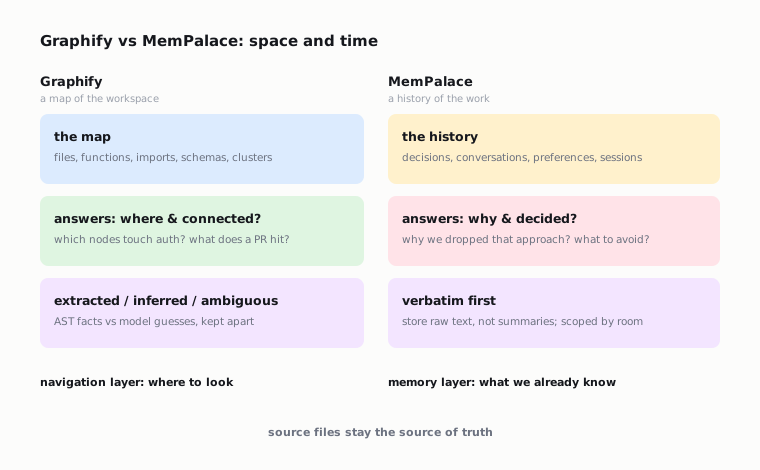 Graphify builds a graph of what's in the project: files, functions, documents, schemas, links, clusters.
MemPalace stores what happened around the project: conversations, decisions, preferences, sessions, reasoning breadcrumbs, old explanations.
Graphify can answer:
```text
Which nodes are connected to the auth flow?
How is RateLimiter connected to the API middleware?
Which files does this PR touch?
Where in the graph is DatabasePool?
Which modules are unexpectedly connected to each other?
```
MemPalace can answer:
```text
Why did we drop the previous auth approach?
Where did we discuss the GraphQL migration?
What did the user ask not to do in this project?
What was the reason for this hack?
What should I recall before continuing the task?
```
If Graphify answers the second type of question, it's faking it. If MemPalace answers the first type, it'll be searching conversation fragments instead of a code map.
A good system doesn't make one layer do the other's job.
## How to combine them into a sane workflow
I'd assemble not an "agent memory stack" but a context hierarchy.
Graphify builds a graph of what's in the project: files, functions, documents, schemas, links, clusters.
MemPalace stores what happened around the project: conversations, decisions, preferences, sessions, reasoning breadcrumbs, old explanations.
Graphify can answer:
```text
Which nodes are connected to the auth flow?
How is RateLimiter connected to the API middleware?
Which files does this PR touch?
Where in the graph is DatabasePool?
Which modules are unexpectedly connected to each other?
```
MemPalace can answer:
```text
Why did we drop the previous auth approach?
Where did we discuss the GraphQL migration?
What did the user ask not to do in this project?
What was the reason for this hack?
What should I recall before continuing the task?
```
If Graphify answers the second type of question, it's faking it. If MemPalace answers the first type, it'll be searching conversation fragments instead of a code map.
A good system doesn't make one layer do the other's job.
## How to combine them into a sane workflow
I'd assemble not an "agent memory stack" but a context hierarchy.
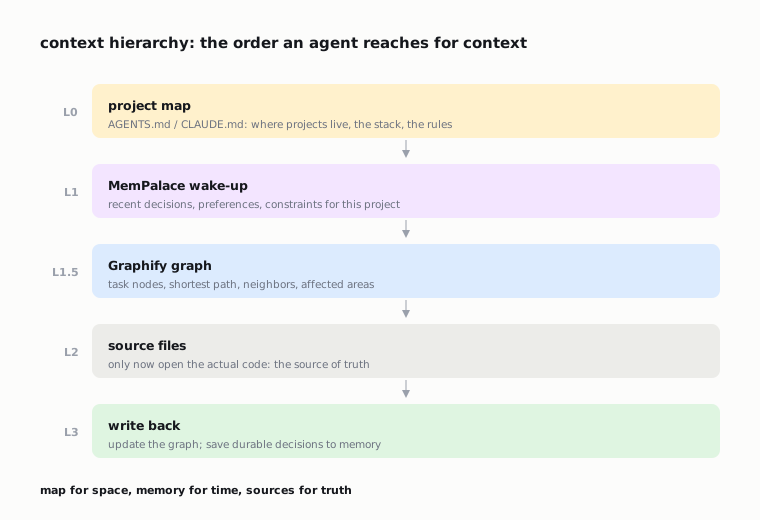 **Layer 0: a short project map.** Where which projects live, what stack, which servers, which rules. This can be `AGENTS.md`, `CLAUDE.md`, an Obsidian index, or a plain markdown file.
**Layer 1: MemPalace wake-up context.** Before the task starts, the agent pulls the latest decisions, preferences, constraints, and old discussions for the project.
**Layer 1.5: the Graphify graph.** Before reading files, the agent asks the map: which nodes relate to the task, what's the shortest path, which neighbors a key node has, which affected areas there are.
**Layer 2: the sources.** Only now does the agent open specific files.
**Layer 3: writing the result back.** After the task, Graphify is updated and MemPalace stores new decisions and fragments that should outlive the session.
The commands might look like this:
```bash
uv tool install graphifyy
uv tool install mempalace
graphify install --project
graphify extract .
graphify hook install
mempalace init ~/projects/myapp
mempalace mine ~/.claude/projects/ --mode convos
mempalace search "auth migration"
```
For a team I'd add a rule to `AGENTS.md` or `CLAUDE.md`:
```text
Before reading source files for architecture questions, query Graphify.
Before proposing changes that may repeat prior decisions, check MemPalace.
After completing a meaningful task, update the graph and save durable decisions.
```
This simple rule beats faith that "the agent will figure it out". It won't. The agent does what the workflow makes cheap and obvious.
## What the companion projects reveal
Companion repos around Graphify and MemPalace are useful not as "more links" but as signs of the problems users run into.
`lucasrosati/claude-code-memory-setup` connects Obsidian and Graphify. The split is clear there: Obsidian stores decisions and project notes, Graphify stores the code map, a chat import pipeline pulls in conversations. It's almost the same layered workflow, just with Obsidian instead of MemPalace.
`ai-context-hierarchy` puts it even more simply: the agent needs a top-down path. First the global project map, then project context, then Graphify, then files. It's human navigation ported into the agent.
`slurp` shows a second-order problem. Even if Graphify built a large graph, you can't hand the agent the whole graph every time. Slurp picks a relevant subgraph under a token budget. The next layer after "build the map" is "serve a small map for the current question".
`GraphiQuest` adds a human UI: a 3D dashboard, hotspots, orphan candidates, trace. Not everyone needs a 3D graph, but the idea is useful: a code graph can be not only an agent's tool but also a way for a human to see strange connections.
`graphify-go` and `graphify-ts` show infrastructure pressure. When a tool is needed every day, people care about speed, a single binary, less Python dependency hell, WASM/tree-sitter, and integration with a specific environment.
On the MemPalace side, `opencode-plugin-mempalace`, `hermes-plugin-mempalace`, `mempalace-evolve`, and a Rust port play a similar role. They show the pain isn't in the search command but in the lifecycle: auto-save, pre-compaction, diary, review queue, concurrency, packaging.
## What I wouldn't do
I wouldn't start with a giant "let's dump everything into memory". That's almost guaranteed to create garbage.
Don't automatically save every thought of the model as durable memory. The model can be wrong. It can temporarily believe a hypothesis that tests refute five minutes later. If that lands in memory without proof/status, a future agent gets poisoned context.
Don't hand the agent the whole Graphify report in every prompt. The map is for navigation, not a new way to stuff the context.
Don't treat `graph.json` as truth. It's an index, not a source of truth. For code changes, the source of truth stays the repository.
Don't ignore secrets. Both Graphify and MemPalace can walk over sensitive files if you let them. You need `.graphifyignore`, clear exclude rules, care with Claude/Codex logs, and a manual check of what ends up in long-term memory.
Don't accept benchmark headlines without reading the metrics. Token reduction, retrieval recall, QA accuracy, and agent task success measure different things.
## A more honest recommendation
If the agent often wanders around the repository, start with Graphify.
Don't check the stars or the HTML visualization — check one scenario: ask the agent an architecture question before Graphify and after Graphify. How many files did it open? How many tool calls did it make? Did it find the right node faster? Did the share of random reading go down?
If the agent forgets decisions, start with MemPalace.
Don't check the pretty wings/rooms structure — check search over old phrases. Take a real past session, find a decision you remember, and see whether MemPalace pulls the right drawer. Then check the wake-up context: does it help start a new session without retelling the whole history?
If you have both problems, combine the layers.
A minimal mature setup:
```text
AGENTS.md / CLAUDE.md: a short project map and rules
Graphify: a structural map of the repository
MemPalace: the history of decisions and conversations
Hooks: update after changes and save before compaction/session end
Ignore rules: protection from garbage and secrets
Verification: the agent cites a source_location or a drawer, not "I remember"
```
It doesn't sound like magic. Good. Agent memory should be boring infrastructure.
## The final point
Graphify and MemPalace shouldn't be explained as two flavors of one tool.
Graphify is a map. It cuts blind recon, shows connections, and helps the agent reach the right piece of code faster.
MemPalace is a history. It keeps old conversations, decisions, and project experience that doesn't always make it into the repository.
A good agent workflow doesn't start with "give the model more context". It starts with separating context by type.
The map handles space.
Memory handles time.
The sources handle truth.
Keep these layers separate and the agent wanders less, repeats itself less, and more often starts from where you left off instead of from yet another blind `grep` across the repository.
## Sources
- [Graphify GitHub:](https://github.com/safishamsi/graphify)
- [Graphify PyPI:](https://pypi.org/project/graphifyy/)
- [Graphify architecture:](https://github.com/safishamsi/graphify/blob/v8/ARCHITECTURE.md)
- [Graphify how it works:](https://github.com/safishamsi/graphify/blob/v8/docs/how-it-works.md)
- [Graphify security policy:](https://github.com/safishamsi/graphify/blob/v8/SECURITY.md)
- [Claude Code + Obsidian + Graphify:](https://github.com/lucasrosati/claude-code-memory-setup)
- [ai-context-hierarchy:](https://github.com/CreatmanCEO/ai-context-hierarchy)
- [slurp:](https://github.com/CarlosVallejoRuiz/slurp)
- [GraphiQuest:](https://github.com/Bosheda/graphiquest)
- [graphify-go:](https://github.com/techinpark/graphify-go)
- [graphify-ts:](https://github.com/Howell5/graphify-ts)
- [MemPalace GitHub:](https://github.com/MemPalace/mempalace)
- [MemPalace palace concept:](https://mempalaceofficial.com/concepts/the-palace.html)
- [MemPalace Claude Code retention:](https://mempalaceofficial.com/guide/claude-code-retention.html)
- [MemPalace benchmarks:](https://github.com/MemPalace/mempalace/tree/develop/benchmarks)
- [MemPalace benchmark methodology discussion:](https://github.com/MemPalace/mempalace/discussions/747)
- [opencode-plugin-mempalace:](https://github.com/option-K/opencode-plugin-mempalace)
- [hermes-plugin-mempalace:](https://github.com/OVER99K/hermes-plugin-mempalace)
- [mempalace-evolve:](https://github.com/a2328275243/mempalace-evolve)
- [Rust MemPalace port:](https://github.com/bunkerlab-net/mempalace)
**Layer 0: a short project map.** Where which projects live, what stack, which servers, which rules. This can be `AGENTS.md`, `CLAUDE.md`, an Obsidian index, or a plain markdown file.
**Layer 1: MemPalace wake-up context.** Before the task starts, the agent pulls the latest decisions, preferences, constraints, and old discussions for the project.
**Layer 1.5: the Graphify graph.** Before reading files, the agent asks the map: which nodes relate to the task, what's the shortest path, which neighbors a key node has, which affected areas there are.
**Layer 2: the sources.** Only now does the agent open specific files.
**Layer 3: writing the result back.** After the task, Graphify is updated and MemPalace stores new decisions and fragments that should outlive the session.
The commands might look like this:
```bash
uv tool install graphifyy
uv tool install mempalace
graphify install --project
graphify extract .
graphify hook install
mempalace init ~/projects/myapp
mempalace mine ~/.claude/projects/ --mode convos
mempalace search "auth migration"
```
For a team I'd add a rule to `AGENTS.md` or `CLAUDE.md`:
```text
Before reading source files for architecture questions, query Graphify.
Before proposing changes that may repeat prior decisions, check MemPalace.
After completing a meaningful task, update the graph and save durable decisions.
```
This simple rule beats faith that "the agent will figure it out". It won't. The agent does what the workflow makes cheap and obvious.
## What the companion projects reveal
Companion repos around Graphify and MemPalace are useful not as "more links" but as signs of the problems users run into.
`lucasrosati/claude-code-memory-setup` connects Obsidian and Graphify. The split is clear there: Obsidian stores decisions and project notes, Graphify stores the code map, a chat import pipeline pulls in conversations. It's almost the same layered workflow, just with Obsidian instead of MemPalace.
`ai-context-hierarchy` puts it even more simply: the agent needs a top-down path. First the global project map, then project context, then Graphify, then files. It's human navigation ported into the agent.
`slurp` shows a second-order problem. Even if Graphify built a large graph, you can't hand the agent the whole graph every time. Slurp picks a relevant subgraph under a token budget. The next layer after "build the map" is "serve a small map for the current question".
`GraphiQuest` adds a human UI: a 3D dashboard, hotspots, orphan candidates, trace. Not everyone needs a 3D graph, but the idea is useful: a code graph can be not only an agent's tool but also a way for a human to see strange connections.
`graphify-go` and `graphify-ts` show infrastructure pressure. When a tool is needed every day, people care about speed, a single binary, less Python dependency hell, WASM/tree-sitter, and integration with a specific environment.
On the MemPalace side, `opencode-plugin-mempalace`, `hermes-plugin-mempalace`, `mempalace-evolve`, and a Rust port play a similar role. They show the pain isn't in the search command but in the lifecycle: auto-save, pre-compaction, diary, review queue, concurrency, packaging.
## What I wouldn't do
I wouldn't start with a giant "let's dump everything into memory". That's almost guaranteed to create garbage.
Don't automatically save every thought of the model as durable memory. The model can be wrong. It can temporarily believe a hypothesis that tests refute five minutes later. If that lands in memory without proof/status, a future agent gets poisoned context.
Don't hand the agent the whole Graphify report in every prompt. The map is for navigation, not a new way to stuff the context.
Don't treat `graph.json` as truth. It's an index, not a source of truth. For code changes, the source of truth stays the repository.
Don't ignore secrets. Both Graphify and MemPalace can walk over sensitive files if you let them. You need `.graphifyignore`, clear exclude rules, care with Claude/Codex logs, and a manual check of what ends up in long-term memory.
Don't accept benchmark headlines without reading the metrics. Token reduction, retrieval recall, QA accuracy, and agent task success measure different things.
## A more honest recommendation
If the agent often wanders around the repository, start with Graphify.
Don't check the stars or the HTML visualization — check one scenario: ask the agent an architecture question before Graphify and after Graphify. How many files did it open? How many tool calls did it make? Did it find the right node faster? Did the share of random reading go down?
If the agent forgets decisions, start with MemPalace.
Don't check the pretty wings/rooms structure — check search over old phrases. Take a real past session, find a decision you remember, and see whether MemPalace pulls the right drawer. Then check the wake-up context: does it help start a new session without retelling the whole history?
If you have both problems, combine the layers.
A minimal mature setup:
```text
AGENTS.md / CLAUDE.md: a short project map and rules
Graphify: a structural map of the repository
MemPalace: the history of decisions and conversations
Hooks: update after changes and save before compaction/session end
Ignore rules: protection from garbage and secrets
Verification: the agent cites a source_location or a drawer, not "I remember"
```
It doesn't sound like magic. Good. Agent memory should be boring infrastructure.
## The final point
Graphify and MemPalace shouldn't be explained as two flavors of one tool.
Graphify is a map. It cuts blind recon, shows connections, and helps the agent reach the right piece of code faster.
MemPalace is a history. It keeps old conversations, decisions, and project experience that doesn't always make it into the repository.
A good agent workflow doesn't start with "give the model more context". It starts with separating context by type.
The map handles space.
Memory handles time.
The sources handle truth.
Keep these layers separate and the agent wanders less, repeats itself less, and more often starts from where you left off instead of from yet another blind `grep` across the repository.
## Sources
- [Graphify GitHub:](https://github.com/safishamsi/graphify)
- [Graphify PyPI:](https://pypi.org/project/graphifyy/)
- [Graphify architecture:](https://github.com/safishamsi/graphify/blob/v8/ARCHITECTURE.md)
- [Graphify how it works:](https://github.com/safishamsi/graphify/blob/v8/docs/how-it-works.md)
- [Graphify security policy:](https://github.com/safishamsi/graphify/blob/v8/SECURITY.md)
- [Claude Code + Obsidian + Graphify:](https://github.com/lucasrosati/claude-code-memory-setup)
- [ai-context-hierarchy:](https://github.com/CreatmanCEO/ai-context-hierarchy)
- [slurp:](https://github.com/CarlosVallejoRuiz/slurp)
- [GraphiQuest:](https://github.com/Bosheda/graphiquest)
- [graphify-go:](https://github.com/techinpark/graphify-go)
- [graphify-ts:](https://github.com/Howell5/graphify-ts)
- [MemPalace GitHub:](https://github.com/MemPalace/mempalace)
- [MemPalace palace concept:](https://mempalaceofficial.com/concepts/the-palace.html)
- [MemPalace Claude Code retention:](https://mempalaceofficial.com/guide/claude-code-retention.html)
- [MemPalace benchmarks:](https://github.com/MemPalace/mempalace/tree/develop/benchmarks)
- [MemPalace benchmark methodology discussion:](https://github.com/MemPalace/mempalace/discussions/747)
- [opencode-plugin-mempalace:](https://github.com/option-K/opencode-plugin-mempalace)
- [hermes-plugin-mempalace:](https://github.com/OVER99K/hermes-plugin-mempalace)
- [mempalace-evolve:](https://github.com/a2328275243/mempalace-evolve)
- [Rust MemPalace port:](https://github.com/bunkerlab-net/mempalace)