One day my agent pulled a fresh campaign list and told the user traffic was down. The data was fine. What got cut wasn’t traffic — it was the tail of the list: the tool result blew past the context budget, the code silently truncated it, and the model dutifully read the hole as a fact. I spent a long time hunting for the bug in the prompt. The prompt was innocent. The context was broken.
“Fix the prompt” is the most common useless advice in LLM product work. Almost every “dumb” model answer in production traces back to the same root: the model didn’t see what I assumed was obvious, or saw something it never should have.
I’m building PRIQO, an AI analyst for marketing: users ask about GA4, Google Ads, Search Console, Merchant Center, Meta, and LinkedIn data in any language; the agent answers with text, charts, and reports in real time. Under the hood: a ReAct loop with forty tools, multi-provider model routing, and SSE streaming. This post is about how context works in an agent like this. The prompt is only the top layer. Five percent, give or take. The rest is architecture: what the model sees, when, what it costs, and what it never sees at all.
1. The system prompt is a layered cache architecture
My system prompt isn’t written — it’s assembled, on every request, from blocks with different rates of change, and that layering directly drives the economics.
- Layer 1 — the core. Global behavior rules, shared by all users. Changes with releases. The provider caches it once for everyone.
- Layer 2 — source reference docs. Documentation for every connected source type: what GA4 fields are called, what query patterns Ads expects, how to pick a visualization. It loads per source type, not per account, so the cache survives any number of clients with the same set of connections.
- Layer 3 — the project memory snapshot. What the agent knows about this project from past conversations. The snapshot data refreshes every 24 hours, and the block itself is assembled deterministically: between refreshes, the same data yields a byte-identical block, otherwise the cache would never hit.
- The volatile tail. Everything that lives for a single turn: account and currency bindings, loaded skills, few-shot examples, URL prefetch results, and the language block. The language block goes last on purpose: models have recency bias, and end-of-prompt instructions stick better.
In code it’s literally a list of blocks with a cacheability flag:
def build_prompt(ctx) -> list[Block]:
    return [
        Block(core_rules(),                  cacheable=True),   # one for everyone
        Block(source_docs(ctx.source_types), cacheable=True),   # per source TYPE
        Block(project_memory(ctx.project),   cacheable=True),   # daily snapshot
        Block(bindings(ctx) + skills(ctx) + examples(ctx),
                                             cacheable=False),  # lives for one turn
        Block(language_rule(ctx.lang),       cacheable=False),  # last: recency bias
    ]
Caching has a non-obvious trap: a cache write costs more than plain inference (about 1.25×), while a read is an order of magnitude cheaper (0.1×). Caching small blocks means paying extra for nothing, so I don’t cache blocks under ~2,000 tokens.
This isn’t theory: over the past two months, 63% of all input tokens the agent consumed came from cache (on some providers, up to 65–70%). Two thirds of the context the model sees, I neither pay full price for nor wait to be reprocessed. One caveat for every number in this post: production volume is still modest, 135 agent turns over 60 days. Too small for statistics, enough to watch the mechanics behave with live users.
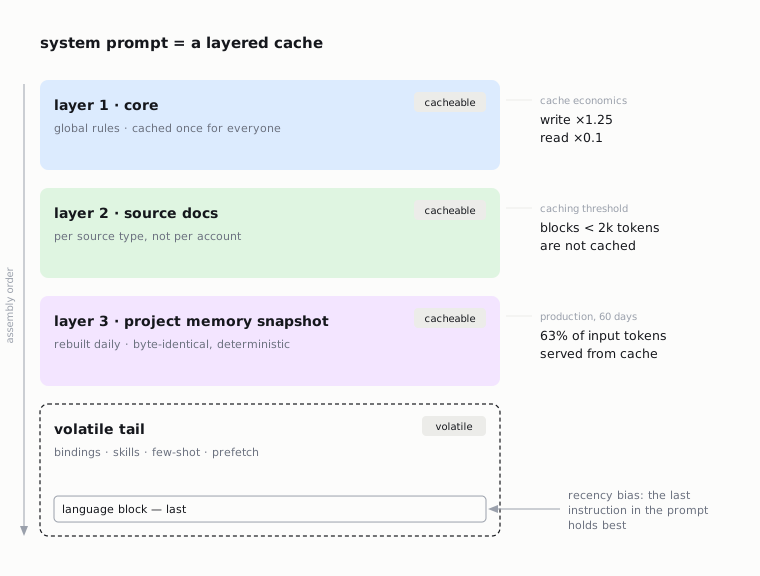
Takeaway: treat the prompt as a cache layout. Put stable content first and in large blocks. Keep volatile content in the tail. Price writes, not just reads.
2. The classifier is a budget dispatcher, not a formality
Before the expensive model ever sees a request, it passes through two tiers. Tier 0 is regex, zero tokens: prompt-extraction attempts are caught by patterns in seven languages and get a canned refusal; “what can you do?” gets a ready answer in the user’s language — no LLM call at all. Tier 1 is a small classifier model returning strict JSON: intent, data source, language, and the key field — complexity. Output is capped at 256 tokens. The classifier doesn’t get to think out loud.
Complexity converts into resources downstream: simple and medium requests go to the fast model pool, complex ones to the heavy pool, and the agent-loop iteration cap grows with the tier (4/6/8). In production the split looks like this: 78% of turns stay on the fast pool — only every fifth request actually needs the heavy model. And the median is 2 loop iterations in both tiers: most questions close as “fetch the data → answer”, with the iteration headroom acting as insurance for the tail, not the norm. If the intent loads an expert skill (say, “GA4 advisor” mode), the tier gets force-upgraded: advice from a weak model is worse than a slightly more expensive answer that is actually useful.
Language belongs here too. All my prompts, few-shot examples included, are written in English only — frontier models handle this well at inference time, and an English example like “Generate a new variant” fires correctly on «сгенерируй вариант» and «اصنع متغيرًا», so duplicating examples in N languages just bloats context with no accuracy gain. The language of the answer is enforced by a separate mechanism: the classifier detects the language of the last message (telling Ukrainian from Russian by the unique letters ї, є, ґ), and an enforcement block at the end of the prompt demands a single language across the whole reply, down to chart labels.
Takeaway: decide how much thinking to buy before the expensive call, using a cheap mechanism. (How the pool router itself works is a post of its own.)
3. The agent doesn’t see all the tools — or full results
The agent has over forty tools, but in any given conversation it only sees the tools for connected sources, plus the universal ones. The cross-channel report builder appears in the list only when two or more sources are connected — I don’t give the model tools it can’t use. Reference tools (metric schemas) disappear from the list after the first call in a turn: there’s no reason to ask for a schema twice.
Two mechanisms keep the loop from bloating. The first is a dedup cache for tool calls: the key is the tool name plus canonicalized parameters; if the model asks for the same data twice, it gets the cached result instantly and for free. In production it serves roughly one tool call in ten. Models really do ask twice. Only successes are cached: errors keep their right to a retry. And 16% of turns close without a single tool call — the answer is already in the conversation, and the discipline of “don’t fetch what you already know” saves loop iterations too.
The second is smart truncation of observations — the one this post opened with (a simplified cut of the real code):
def to_observation(result, max_chars=32_000) -> str:
    text = compact_json(result)
    if len(text) <= max_chars:
        return text
    items, key = largest_list(result)   # rows, campaigns, audiences…
    lo, hi = 1, len(items)
    while lo < hi:                      # binary search: how many WHOLE
        mid = (lo + hi + 1) // 2        # items fit the budget
        if fits(result, key, items[:mid], max_chars):
            lo = mid
        else:
            hi = mid - 1
    return compact_json(replace(result, key, items[:lo])) + (
        f"\n(showing {lo} of {len(items)} items — "
        "data is COMPLETE from API, only truncated for display)"
    )
But the truncation technique is half the story. The important part is the last line: the phrase that travels with the cut. Without it, the model read a truncated list as a small one, and “traffic dropped”. With it, the model understands it’s looking through a window, not at the whole world.
Takeaway: the tool list is part of the context — manage it as actively as the prompt. And any truncation of data must be annotated for the model, or it will read the hole as a fact.
4. Numbers must not pass through a retelling
In analytics, the most expensive hallucination is a number. A user will forgive clumsy wording; they will not forgive invented revenue. The defense is layered:
- The prompt core carries a hard rule: every number, URL and name in the answer must originate from a tool result. No estimates, no extrapolations, no “roughly”. Benchmarks come only from the loaded advisor reference.
- Markdown tables are forbidden to the agent: instead of retelling data as text, it emits a
CHART_DATAblock — pure JSON that the frontend renders with ECharts. The model decides which chart to build; layout and rendering are done by code. - Tool results are treated as untrusted data: if text inside an API response looks like an instruction, the agent must ignore it. That’s the cordon against injection through data.
Takeaway: split the roles — the model chooses and explains, the code delivers and draws. The shorter a number’s path from API to screen, the fewer places it can drift.
5. Deferred context: don’t pay for the rules on every iteration
A ReAct loop means several model calls in a row, and every extra kilobyte of system prompt is billed on every one of them. So part of my context is deferred: the detailed chart-building rules (type selection, top-N limits, cohort formats) are absent from the prompt while the agent walks the tools — they load once, right before the final answer generation, the only moment they’re needed.
Takeaway: ask every block of context not just “are you needed”, but “when are you needed”. Many instructions are needed exactly once.
6. Memory: three horizons instead of an endless history
An endlessly growing chat history is the laziest, most expensive way to “remember”. My memory is split across three horizons:
- Within a session: older messages compress into a progressive summary, inserted as a “previous conversation context” block; recent turns go in as-is, enriched with a compact digest of past tool calls (what was called, with what parameters, what came back — without the full payloads).
- Across sessions: the project memory snapshot — entities and relations extracted from past conversations, rebuilt daily, landing in the cacheable prompt layer.
- For the current turn: targeted retrieval — findings relevant to the question at hand, as a small volatile block.
Takeaway: “memory” isn’t one thing — it’s at least three, each with its own refresh rate and cache strategy. Mixing them into one long history means paying for everything, every single time.
7. What the model should never generate at all
While the agent works, the user sees live progress: statuses, tool-call chips, a token stream. It’s tempting to let the model narrate its own progress. I did the opposite: the interface stream is assembled from 36 types of domain events, and status texts come from code and the database, not from the model. The model can’t embellish its progress, because it isn’t the one telling the story.
This is part of a broader rule I learned the painful way: the agent’s narrative is not ground truth. A model can write, beautifully, “I built the chart from real data” — the only things you can trust are tool calls and execution logs. Anything critical to user trust must be generated by code from facts, not by the model from text.
Takeaway: every time you want the model to report system state, ask yourself: does it actually know it?
The checklist
- The system prompt is a cache layout: stable first, volatile in the tail, small blocks not cached (writes cost more than reads).
- A cheap dispatcher in front of the expensive model: regex → light classifier → tier, iteration cap and tool set by complexity.
- The agent sees only applicable tools; a duplicate tool call is a cache hit, not a second call.
- Any data truncation is annotated for the model, or the hole becomes a “fact”.
- Numbers and charts travel as JSON blocks to code, not as retellings; tool data is untrusted.
- Context can be deferred: final-answer rules don’t ride along on every iteration.
- Memory is three horizons (session summary / daily snapshot / per-turn retrieval), not an endless history.
- Statuses and progress are generated by code from events, not by the model from imagination.
- Prompts in English; answer language enforced by a separate block at the end.
None of this is solved by a “good prompt”. It’s solved by architecture: what the model sees, when it sees it, what it costs, and what it never sees. That is context engineering.