The short version
Spec-Driven Development, or SDD, is a way to work with AI assistants not through an endless chat and “vibe coding,” but through explicit specifications: requirements, scenarios, design, and a task list. First agree with the agent on what exactly should change, then let it write the code, checking the result not by taste but against the agreed artifacts.
OpenSpec is one of the most practical tools for this kind of process. It is not a new IDE or a cloud service, but a lightweight open-source layer on top of an existing project and your favorite AI tool: Claude Code, Cursor, Codex, GitHub Copilot, OpenCode, Windsurf, Gemini CLI, Kiro, and many others. It creates an openspec/ folder in the repository, where the system’s current specifications and individual change folders live.
The main OpenSpec formula:
idea → proposal → delta specs → design → tasks → implementation → sync/archiveIn the standard fast profile it looks like this:
/opsx:propose → /opsx:apply → /opsx:sync → /opsx:archive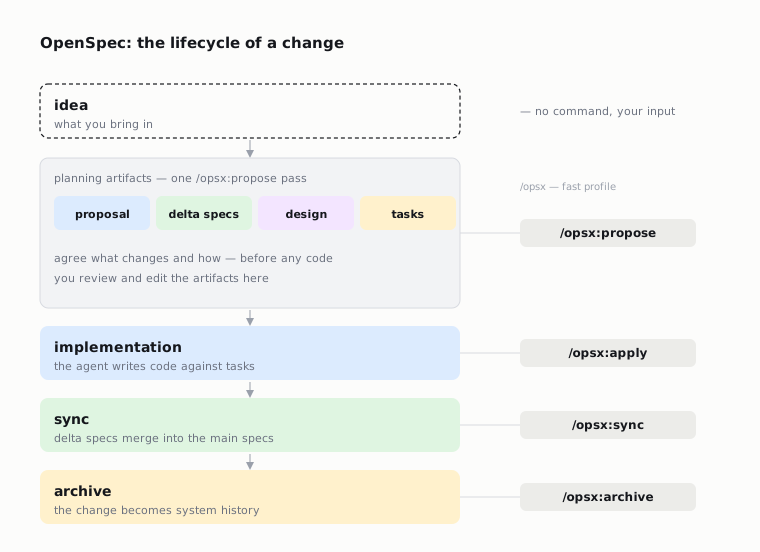
Why SDD became important right now
AI coding sharply lowered the cost of writing code, but it did not lower the cost of misunderstanding. If a task is described vaguely, the agent quickly produces a lot of code that looks convincing but diverges from the real requirements. The bigger the project, the worse the problem:
- requirements stay in the chat history and get lost between sessions;
- the agent forgets context, because the context window is not infinite;
- different changes overlap and conflict;
- review turns into reading a diff, even though the error was often not in the code but in the original intent;
- the team does not understand why one decision or another was made.
SDD shifts the center of gravity from “write the code” to “first capture the intent.” This is especially useful for agentic development, where the same person can launch several independent AI tasks in a single day.
GitHub Spec Kit formulates a more radical version of the approach: the specification becomes the primary artifact, and the code becomes an expression of that specification. In their text, SDD is described as an inversion of the usual model where “code is truth”: now specifications do not serve the code, the code serves the specifications.
Kiro, for its part, promotes a similar idea as “engineering rigor for agentic development”: a natural-language request turns into requirements and acceptance criteria, then into architectural design, then into discrete tasks linked to requirements.
OpenSpec takes a lighter and more pragmatic position: it does not try to replace the whole development environment, but provides a portable format and commands that work with existing agents.
What OpenSpec is
OpenSpec is an AI-native system for spec-driven development. Repository: https://github.com/Fission-AI/OpenSpec. The npm package: @fission-ai/openspec, the current studied version is 1.4.1. The project is written in TypeScript and distributed under MIT.
The philosophy from the OpenSpec documentation:
fluid not rigid         — no hard phase gates
iterative not waterfall — refine as you go
easy not complex        — minimal ceremony
brownfield-first        — built for existing codebases
This is an important difference from heavyweight processes. OpenSpec does not say: “first fully finish the spec, then the design, then the code.” It says: “create a good-enough description, start working, and update the artifacts as you learn more.”
How OpenSpec organizes a project
After openspec init the project gets this structure:
openspec/
├── specs/              # source of truth: how the system works now
│   └── <domain>/
│       └── spec.md
├── changes/            # proposed changes: one folder per change
│   └── <change-name>/
│       ├── proposal.md
│       ├── design.md
│       ├── tasks.md
│       └── specs/      # delta specs: what changes
│           └── <domain>/
│               └── spec.md
└── config.yaml         # optional project context and rules
Two main entities:
openspec/specs/— the current description of the system’s behavior. This is “what’s true now.”openspec/changes/— work in progress. Every feature, bugfix, or refactor lives separately until it is finished and archived.
This format brings several advantages:
- You can run several changes in parallel.
- You can review not only the code, but the intent.
- You can understand the history of a decision: proposal, design, tasks, and the spec delta remain in the archive.
- You can restore context in a new AI session without retelling the whole history.
The main OpenSpec artifacts
proposal.md
It answers “why” and “what changes.” A good proposal captures:
- the intent;
- the problem or user need;
- scope;
- what is out of scope;
- the general approach;
- risks and rollback, if it matters.
Example:
# Proposal: Add Dark Mode

## Intent
Users need a dark mode option to reduce eye strain during nighttime usage.

## Scope
- Add theme toggle in settings
- Support system preference detection
- Persist preference in localStorage

## Approach
Use CSS custom properties for theming with a React context for state management.
Delta specs
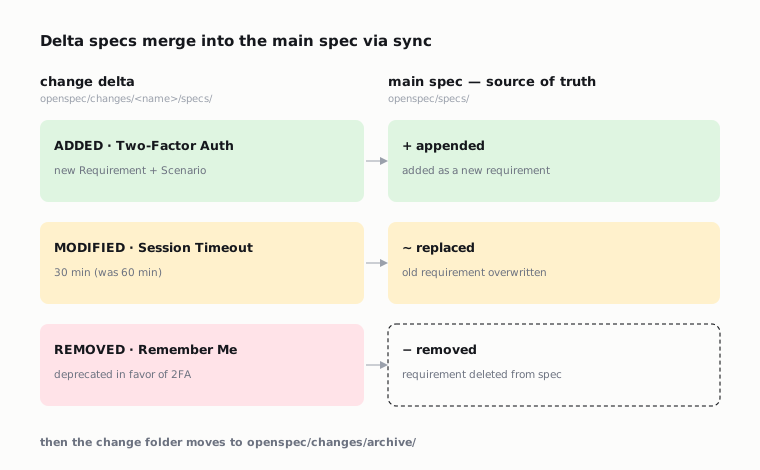
Delta specs are the key idea of OpenSpec. Instead of rewriting all the documentation, a change describes exactly what is added, changed, or removed.
The format:
# Delta for Auth

## ADDED Requirements

### Requirement: Two-Factor Authentication
The system MUST require a second factor during login.

#### Scenario: OTP required
- GIVEN a user with 2FA enabled
- WHEN the user submits valid credentials
- THEN an OTP challenge is presented

## MODIFIED Requirements

### Requirement: Session Timeout
The system SHALL expire sessions after 30 minutes of inactivity.
(Previously: 60 minutes)

## REMOVED Requirements

### Requirement: Remember Me
Deprecated in favor of 2FA.
Applying the deltas — sync:
ADDEDis added to the main spec;MODIFIEDreplaces an existing requirement;REMOVEDdeletes a requirement.
Archiving — archive — then moves the change folder to openspec/changes/archive/ (offering to run sync first if you haven’t).
design.md
The technical approach: architecture, trade-offs, APIs, migrations, risks, and the reasons behind the choices. This is the place where the agent must explain how it intends to implement the requirements.
tasks.md
The implementation checklist. It turns the design into concrete steps:
# Tasks

## 1. Theme Infrastructure
- [ ] 1.1 Create ThemeContext with light/dark state
- [ ] 1.2 Add CSS custom properties for colors
- [ ] 1.3 Implement localStorage persistence

## 2. UI Components
- [ ] 2.1 Create ThemeToggle component
- [ ] 2.2 Add toggle to settings page
For an AI agent this is especially valuable: it gets not just a large request, but a sequence of verifiable actions.
OpenSpec commands
OpenSpec installs slash commands into supported AI tools. In the base core profile these are available:
/opsx:propose— create a change and all the planning artifacts;/opsx:explore— investigate the problem before a formal change;/opsx:apply— implement the tasks;/opsx:sync— apply the delta specs to the main specs;/opsx:archive— finish a change and move it to the archive.
The extended profile adds:
/opsx:new— create only the skeleton of a change;/opsx:continue— create the next artifact one at a time;/opsx:ff— quickly create all the planning artifacts;/opsx:verify— check the implementation against proposal/specs/design/tasks;/opsx:bulk-archive— archive several finished changes;/opsx:onboard— a step-by-step walkthrough.
Typical workflows
A quick feature
When the task is clear:
/opsx:propose add-dark-mode
/opsx:apply
/opsx:sync
/opsx:archive
It fits small and medium tasks: add a setting, fix a bug, change an integration, update the UI.
An unclear task
When it is not obvious what exactly to do:
/opsx:exploreThe agent first investigates the codebase, finds options, asks clarifying questions, or suggests approaches. Once the decision has matured:
/opsx:propose optimize-product-list-fetchingA complex task with step-by-step control
In the extended profile:
/opsx:new rewrite-auth-flow
/opsx:continue   # proposal
/opsx:continue   # specs
/opsx:continue   # design
/opsx:continue   # tasks
/opsx:apply
/opsx:verify
/opsx:archive
This is the better way to work with architectural changes, payments, auth, data migrations, and anything where a mistake is expensive.
Parallel changes
OpenSpec lets you keep several folders in openspec/changes/:
openspec/changes/add-dark-mode/
openspec/changes/fix-login-redirect/
openspec/changes/optimize-product-query/
This is handy when an urgent bug interrupts work on a feature. After finishing the bugfix you can return to the previous change ID.
How OpenSpec differs from plan mode in an AI editor
Plan mode is useful, but it usually lives inside the current session or a specific tool. OpenSpec gives a more durable layer:
- the plans sit in the repository;
- they can be reviewed in a pull request;
- they survive a change of agent and session;
- they are linked to requirements and scenarios;
- a change can be archived and merged into the main specification.
In other words, plan mode is assistant behavior, OpenSpec is a project artifact.
How OpenSpec differs from GitHub Spec Kit and Kiro
OpenSpec
Strengths:
- a lightweight layer on top of existing tools;
- works with a long list of AI assistants;
- requires no API keys or MCP;
- a good fit for brownfield projects;
- delta specs are convenient for small and medium changes;
- the TypeScript/npm install is simple for web developers.
Trade-offs:
- artifact quality depends on the model and the team’s discipline;
- you have to get used to updating specs, not just code;
- part of the workflow relies on a correct integration with the specific AI tool.
GitHub Spec Kit
Spec Kit emphasizes a more complete spec-driven cycle: constitution, specify, plan, tasks, implement. Its philosophy is more radical: the specification is the main driver, the code is the output of the specification and the plan. This is powerful, but it can be heavier as a process.
Kiro
Kiro is an agentic IDE/CLI with a built-in spec-driven workflow. It turns a prompt into requirements, design, and tasks inside its own environment. This is convenient if the team is ready to work in Kiro, but less universal than OpenSpec, which is built for different agents and editors.
Installing OpenSpec
Requirements: Node.js 20.19.0+.
Install via npm:
npm install -g @fission-ai/openspec@latestInitialize in a project:
cd your-project
openspec init
Check:
openspec --version
openspec list
openspec validate --all
For a scripted setup:
openspec init --tools claude,cursor
openspec init --tools all
openspec init --tools none
openspec init --profile core
Supported tools
OpenSpec supports installing skills and/or command files for a long list of tools, among them:
- Claude Code;
- Cursor;
- Codex;
- GitHub Copilot;
- OpenCode;
- Windsurf;
- Gemini CLI;
- Kiro;
- Cline;
- RooCode;
- Kilo Code;
- Amazon Q;
- Qwen Code;
- Continue;
- Antigravity;
- and others.
That is, OpenSpec does not force the team to migrate into a single editor. It provides a common working format, and the team picks the agent.
Configuring openspec/config.yaml
Example:
schema: spec-driven

context: |
  Tech stack: TypeScript, React, Node.js
  API conventions: RESTful, JSON responses
  Testing: Vitest for unit tests, Playwright for e2e
  Style: ESLint with Prettier, strict TypeScript

rules:
  proposal:
    - Include rollback plan
    - Identify affected teams
  specs:
    - Use Given/When/Then format for scenarios
  design:
    - Include sequence diagrams for complex flows
What this gives you:
contextis mixed into all instructions;rulesapply to specific artifacts;- the agent holds the project conventions better;
- you need to repeat less in every prompt.
A practical guide: how to adopt SDD in an existing project
Step 1. Install OpenSpec
npm install -g @fission-ai/openspec@latest
cd your-project
openspec init
Pick the tools the team actually uses. You don’t have to install all of them.
Step 2. Add project context
Create or edit openspec/config.yaml:
schema: spec-driven
context: |
  Stack: Next.js, TypeScript, PostgreSQL
  Tests: Vitest for units, Playwright for e2e
  API: REST, JSON, zod validation
  Deployment: Railway
rules:
  specs:
    - Every changed behavior needs at least one scenario
  design:
    - Mention migrations and rollback when data changes
  tasks:
    - Include tests and verification commands
Step 3. Start with a small task
Don’t start by rewriting the whole architecture. Take a small change:
/opsx:propose add-empty-state-to-dashboardCheck the created files:
openspec/changes/add-empty-state-to-dashboard/proposal.md
openspec/changes/add-empty-state-to-dashboard/specs/.../spec.md
openspec/changes/add-empty-state-to-dashboard/design.md
openspec/changes/add-empty-state-to-dashboard/tasks.md
Step 4. Edit the artifacts before the code
Don’t agree automatically. Check:
- whether the task was understood correctly;
- whether there is excess scope;
- whether there are acceptance scenarios;
- whether the design is realistic;
- whether the tasks are concrete enough;
- whether there is verification and tests.
Step 5. Implement
/opsx:applyDuring the work you can clarify:
update design.md: we won't add a new table, we'll use the existing settings
continue apply
Step 6. Verify
If the extended workflow is available:
/opsx:verifyAnd manually:
openspec validate <change-name>
npm test
npm run lint
Step 7. Sync and archive
/opsx:sync
/opsx:archive
After this the main specification is updated, and the change is kept in the archive.
How to write good specs
A good specification describes behavior, not implementation.
Bad:
### Requirement: Use Redis
The system SHALL use Redis for sessions.
Better:
### Requirement: Session persistence
The system SHALL preserve authenticated sessions across application restarts.

#### Scenario: Restart does not log out active user
- GIVEN a user has an active session
- WHEN the application process restarts
- THEN the user remains authenticated
- AND the session expiration time is preserved
Redis may be part of the design, but the requirement must explain what the system wants.
When SDD is especially useful
- AI coding in a large brownfield project;
- several agents or several developers working in parallel;
- requirements are refined often;
- you need traceability from a business decision down to the code;
- tests and acceptance criteria matter;
- there is a risk that the agent “makes it pretty, but wrong”;
- you need to come back to the task after several days or in another session.
When SDD may be overkill
- a one-off 20-line script;
- an experiment that will definitely be thrown away;
- a purely mechanical edit with no behavioral change;
- a task where speed matters more than audit and reproducibility.
Even then you can use a mini version: a short proposal + tasks without a full specification.
Common mistakes
Mistake 1. Generate specs and immediately code
OpenSpec is only useful if a human actually reviews the artifacts. Otherwise it’s just extra markdown files.
Mistake 2. Write requirements as technical tasks
A requirement should describe behavior. Technical decisions go in the design.
Mistake 3. Mix several changes
add-dark-mode-and-refactor-auth is a bad change. Two separate changes are better.
Mistake 4. Don’t archive changes
If changes pile up and never make it into specs/, the source of truth goes stale.
Mistake 5. Don’t update artifacts after discovering new facts
If during implementation it turns out the design was wrong, you should update the design/spec/tasks, not just “agree in the chat.”
A mini change template for a team
# Proposal: <change-name>

## Intent
Why are we doing this?

## Scope
- What changes
- What is explicitly out of scope

## Requirements
- User-visible behavior
- Acceptance scenarios

## Design notes
- Architecture
- Data changes
- Risks
- Rollback

## Tasks
- [ ] Implementation
- [ ] Tests
- [ ] Docs if needed
- [ ] Verification command
A recommended team process
For a team of 2–10 developers:
- Any non-trivial feature starts with
/opsx:propose. - The PR must include
openspec/changes/<change>/. - The reviewer looks at proposal/specs/design/tasks first, then the diff.
- Before merge,
/opsx:verifyor the manual equivalent is run. - After merge the change is archived, the specs are updated.
- Once a week the team cleans up stale changes.
Conclusion
Spec-Driven Development is an answer to a new problem of AI development: code became easy to generate, but intent, requirements, and verifiability did not automatically get better. OpenSpec gives a lightweight, portable way to keep these things in the repository.
The main value of OpenSpec is not the markdown files themselves. The value is that the agent starts working against an explicit contract: the proposal explains the intent, the specs capture the behavior, the design shows the technical path, the tasks set the order of implementation, and the archive turns a change into the system’s history.
Used with discipline, OpenSpec turns AI coding from a stream of improvisation into a managed engineering process — without heavy waterfall and without lock-in to a single IDE.
Sources and what was verified
- OpenSpec GitHub:
- OpenSpec site:
- OpenSpec docs in the repository:
README.md,docs/getting-started.md,docs/concepts.md,docs/workflows.md,docs/opsx.md,docs/commands.md,docs/installation.md,docs/supported-tools.md. - npm package metadata:
@fission-ai/openspec@1.4.1. - GitHub Spec Kit README and
spec-driven.md: - Kiro home/docs: https://kiro.dev/ and
Local check of the OpenSpec repository:
- cloned
Fission-AI/OpenSpec, commit1b06fdd; - files in git: 842;
- TypeScript files: 272, roughly 67k lines;
- Markdown files: 517, roughly 52k lines;
npm run buildfinished successfully;npm testfinished successfully: 89 test files passed, 1661 tests passed.