Herdr is easy to misunderstand. From the name and the general hype around AI tooling, it can look like another local model runner or a new shell for agents — something next to Ollama, LM Studio, Claude Code, Codex, or OpenCode.
It isn’t. Herdr doesn’t run models and doesn’t replace the agent. Its job is simpler: to keep you from losing track when several agent processes are running in the terminal at once. That’s exactly what I keep it open for.
What caught my attention wasn’t only the tool itself, but the story behind the project. Herdr’s author, Can Celik, says the tool was built almost entirely with coding agents. By his account, he hadn’t written Rust before this: he set the architecture, wrote the specs, and guided the work while the agents wrote the code.
I can’t verify that. But the idea itself is interesting: a tool for managing agents, built with the help of agents.
The rest of this is what Herdr feels like in real work.
The problem isn’t the terminal. It’s the number of live processes
While there’s only one agent, you don’t need a special tool.
cd ~/project
claude
Give it a task, wait for the answer, move on.
But agent CLIs quickly stop being “a chat in the terminal”. They run commands, hold context, wait for permissions, hang on tests, and come back with questions. After a while it’s no longer a dialogue. It’s a long-lived process.
One such process is fine. With five, you start managing sessions by hand.
One agent is fixing a bug. Another is running tests. A third is waiting for approval. A fourth is watching logs. A fifth is open in a neighboring worktree, and you no longer remember whether it finished or is still waiting for your reply.
Tmux and Zellij help partly: they keep panes alive, let you detach and reattach, and keep processes running on a server. But for tmux there’s no difference between Claude Code, npm test, tail -f app.log, and a plain shell. It’s all just text streams.
In agent work, something else matters: who is working right now, who is waiting for a decision, who has finished, and who looks alive but has actually been stuck for a while. That’s the gap Herdr aims at.
What Herdr is, and where it sits
Herdr, in short, is a terminal multiplexer for coding agents.
It lives inside your usual terminal: Ghostty, Kitty, iTerm, WezTerm, Alacritty, an SSH client. It doesn’t open a separate web dashboard, doesn’t drag in Electron, and doesn’t make you move your work into a new environment.
Inside it has a familiar model:
- workspace — a project or a big task;
- tab — a mode of work;
- pane — a specific terminal process;
- agent — a recognized pi, Claude Code, Codex, or OpenCode session inside a pane.
From tmux it takes the idea of long-lived panes. From agent tools — the understanding that inside those panes sit not just processes, but agents with their own state.
The easiest way to picture it is as a scale. On one side, classic multiplexers like tmux, screen, and Zellij. They see only terminal streams. On the other, desktop agent apps and managers like cmux or Warp that take the working environment for themselves.
Herdr sits in the middle: it stays in the shell, but understands that agents are working in the panes.
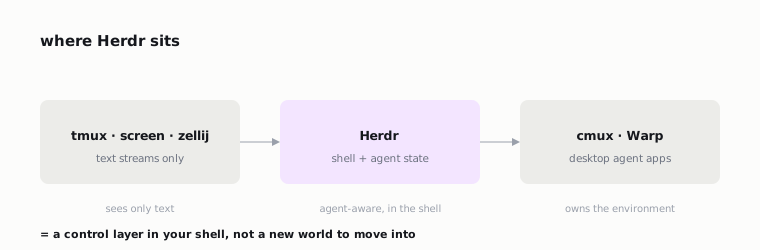
It doesn’t own the model, doesn’t replace the IDE, and doesn’t try to become the new center of all development. It adds a control layer where the agents already live: in the terminal.
The main difference from tmux: Herdr sees the agent’s state
In Herdr there’s a list of agents on the side. For each one you see a state.
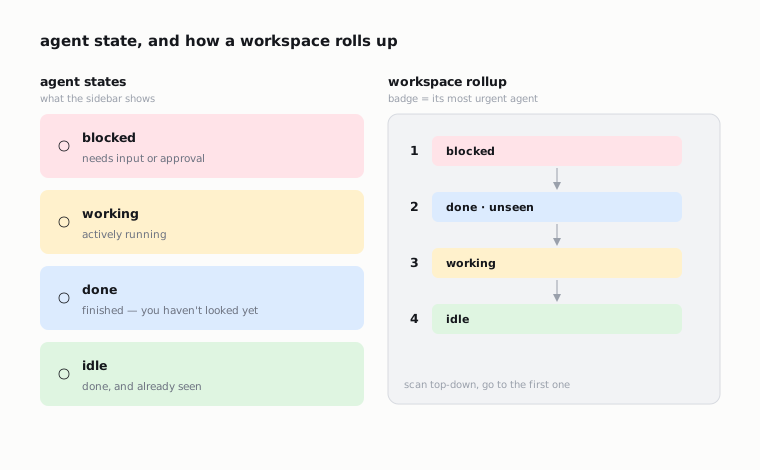
The main states are these:
blocked— the agent needs input or approval;working— the agent is running;done— the agent finished, but you haven’t looked at the result yet;idle— the agent finished, and you’ve already seen the result.
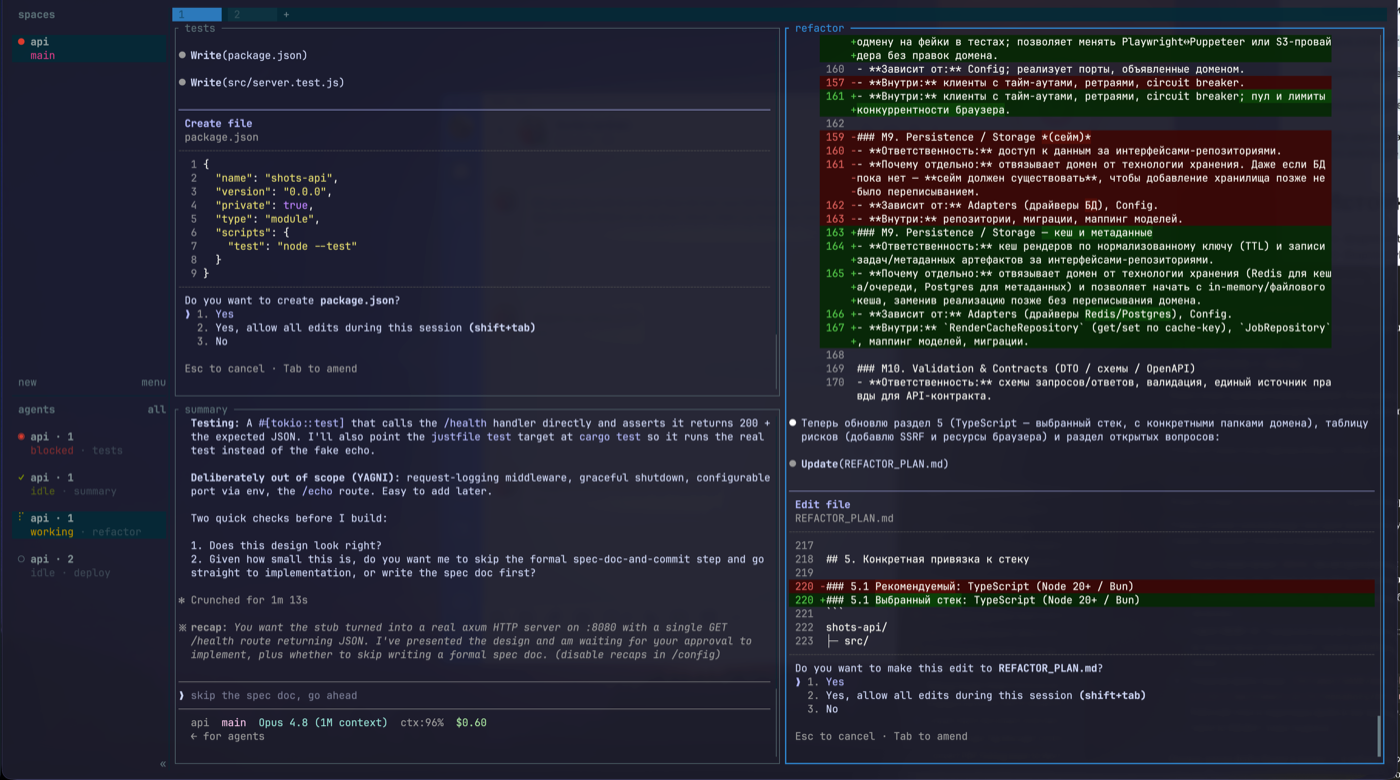
The split between done and idle matters more than it sounds. “Finished but unseen” is exactly the state that usually gets lost between tabs.
A workspace rolls the agents’ state up to the most urgent one. First you see the blocked ones, then the finished-but-unseen, then the working ones, then the ones that aren’t waiting for you.
Without it the loop is familiar: open one tab, realize the agent is waiting for permission; open a second — the tests there already finished; open a third — the agent is still writing; then forget why you opened the first.
Herdr gives you a shared screen: who’s blocked, who finished, who’s still working.
Where to start
Not with ten agents. Not with a pretty “planner → coder → reviewer → QA” diagram. Not by trying to build a full agent team on day one.
Start with one project and one agent.
Linux/macOS:
curl -fsSL https://herdr.dev/install.sh | sh
herdr --version
herdr
If you’re on macOS and use Homebrew:
brew install herdrThen:
cd ~/project
herdr
claude
Then you can open a split for tests or logs:
npm test
# or
just test
# or
tail -f logs/app.log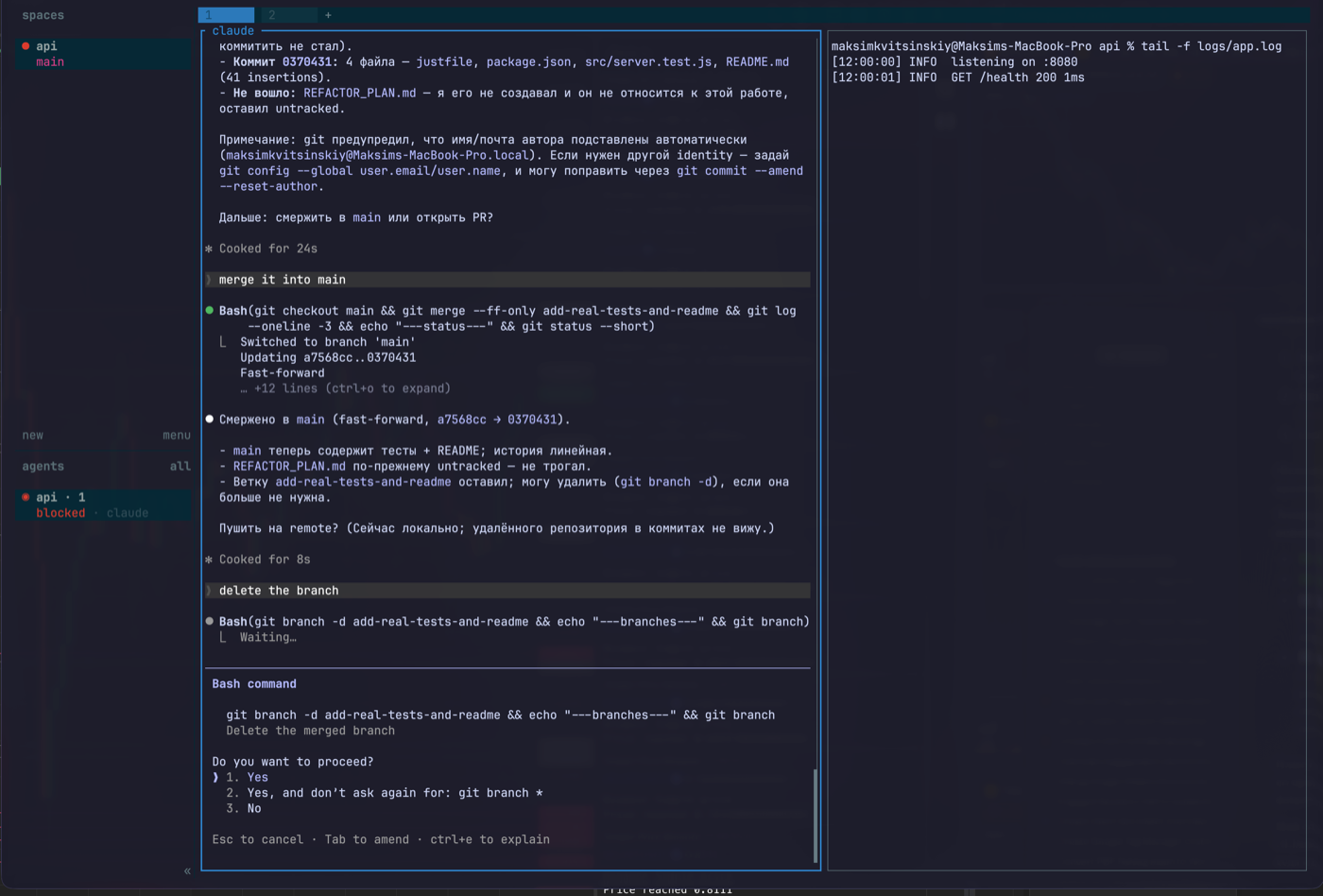
The first day isn’t for automation. It’s for getting used to the model.
Workspace — a project or a big task. Tab — a mode of work: agents, server, logs, review. Pane — one real terminal process. Agent — a specific agent inside a pane.
A simple layout can look like this:
workspace: api
  tab: agents
    pane: claude
    pane: codex
  tab: server
    pane: just dev
  tab: logs
    pane: tail -f logs/app.log
  tab: review
    pane: git diff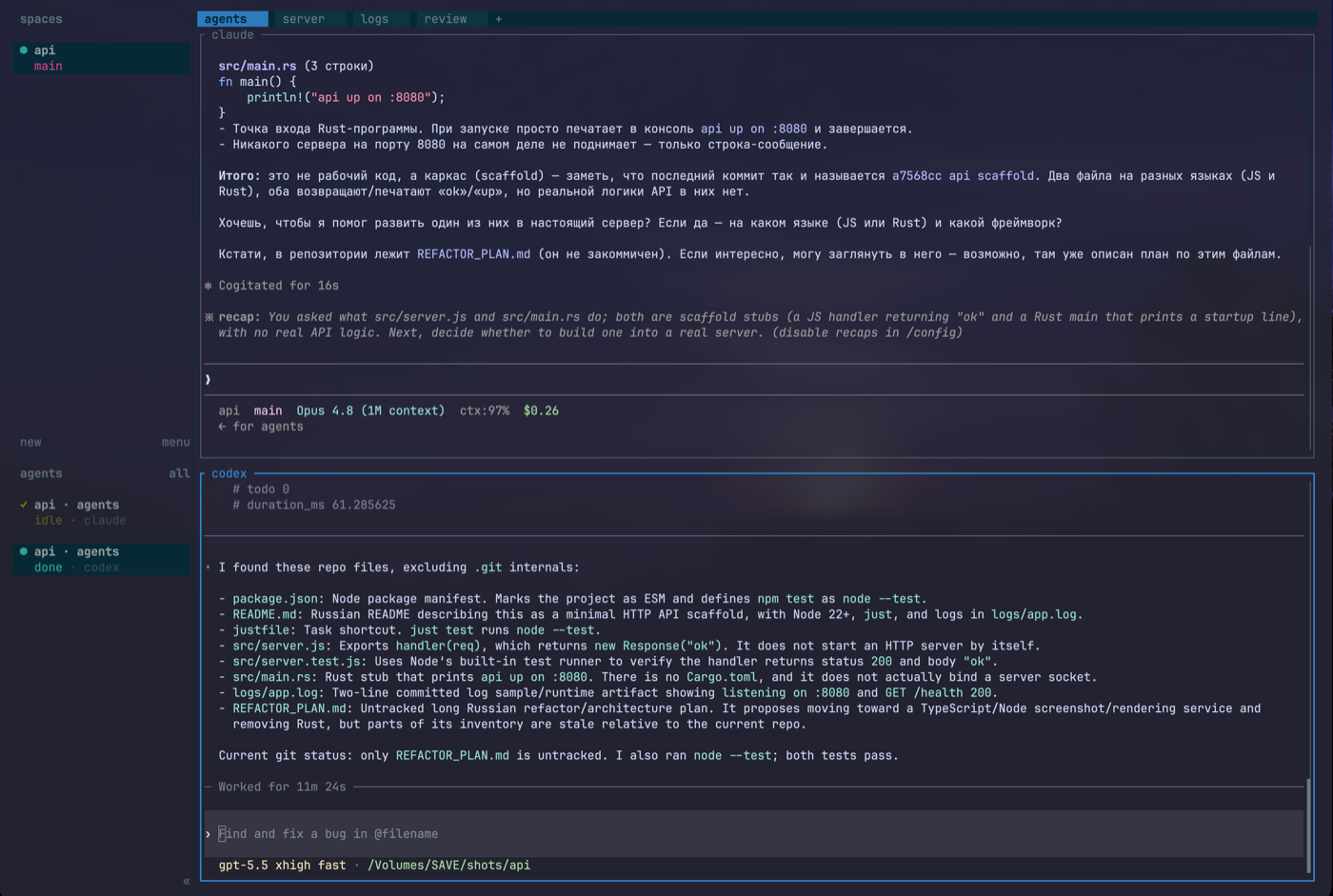
If you dump everything into one tab, Herdr quickly becomes the same chaos, just with frames around it.
The mouse isn’t shameful here
Herdr has hotkeys, and you won’t get far without them. But it doesn’t require you to start by memorizing a separate keyboard religion.
You can click panes, tabs, and workspaces, drag split borders, use the context menu.
A minimal set of keys for the first few days:
ctrl+b, c       new tab
ctrl+b, v       split right
ctrl+b, -       split down
ctrl+b, h/j/k/l move between panes
ctrl+b, q       detach
That’s enough to figure out whether you need Herdr or not.
If you later want the feeling of “a normal macOS app”, add-ons have already appeared around Herdr, such as native-shortcuts-herd. It ties Ghostty and Herdr together so that cmd+t, cmd+w, cmd+1..9, ctrl+tab feel more familiar.
It’s not a required part of Herdr, but a good sign: people set it up not as an academic experiment but as a working environment for their own habits.
Set up integrations early
Herdr can recognize agents from processes and terminal output. But if you’re going to use it seriously, install the integrations right away:
herdr integration install pi
herdr integration install claude
herdr integration install codex
herdr integration install opencode
herdr integration status
Why it matters:
- statuses become more accurate;
- Herdr can better tell who is
working, who isblocked, and who isidle; - restoring agent sessions becomes less of a guessing game;
- the agent itself gets the context that it is running inside Herdr.
pi, the author’s own agent, is listed first among the supported integrations and reports both semantic state and session identity. That makes it the cleanest one to start with if you’re choosing an agent to pair with Herdr.
The supported list is broader, but pi, Claude Code, Codex, and OpenCode are the cases that feel most first-class.
One useful caveat: don’t run tmux inside a Herdr pane and then run the agent inside tmux. In that setup, Herdr sees tmux, not the agent.
If you still want tmux in the stack, first ask what it actually adds on top of Herdr. Often it’s just old muscle memory.
What survives and what doesn’t
It’s easy to drift into marketing nonsense here, so it’s better to separate the scenarios.
Herdr doesn’t make any process survive anything. It has several different mechanisms, and they shouldn’t be mixed up.
Detach/reattach — the clearest and most reliable scenario. The Herdr server keeps running, panes and processes stay alive, you come back later.
Snapshot restore — after stopping and starting the server you can restore the layout, cwd, tabs, panes, and focus. But an arbitrary killed process won’t resurrect itself.
Pane history — this is the screen’s history, not the process. It helps you see what happened, but doesn’t replace a live agent session.
Native agent session restore depends on the integrations and on whether a given agent can report its session identity.
There’s also live handoff:
herdr update --handoffThis is the most interesting engineering part. Herdr tries to pass PTY file descriptors to a new server in order to update without killing the processes. The old server hands ownership of the live terminal panes to the new one.
Technically it’s far more interesting than the usual “restart the app”. But in the docs it’s experimental/opt-in, so don’t build a basic guarantee on it.
The practical takeaway is simple: Herdr reduces the pain of long terminal processes, but doesn’t cancel normal discipline. Commits, reproducible run commands, logs, and a clear project structure are still needed.
The architecture, and why the socket API matters
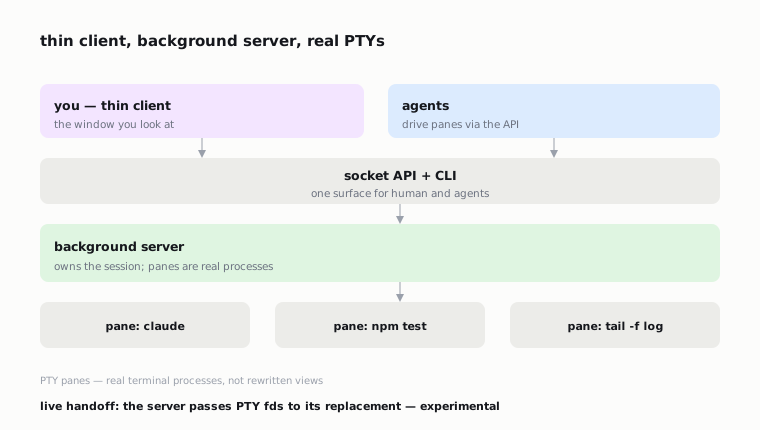
Most of the sense of reliability in Herdr comes from one decision: by default it attaches to a background server, and the panes stay real terminal processes.
The thing you look at is a thin client. The work lives in the server. Live handoff is the passing of PTY file descriptors from the old server to the new one.
The same server gives a socket API and a CLI. That turns Herdr from a human interface into an automation layer as well. Through the API you can create panes, run commands, read output, and wait for the state you need.
This changes the scenario.
You ask an agent to check the project. In a normal Herdr session it can open a separate pane for tests, run npm test or just test, open a pane with logs, read the output, wait for a specific marker, and return the result.
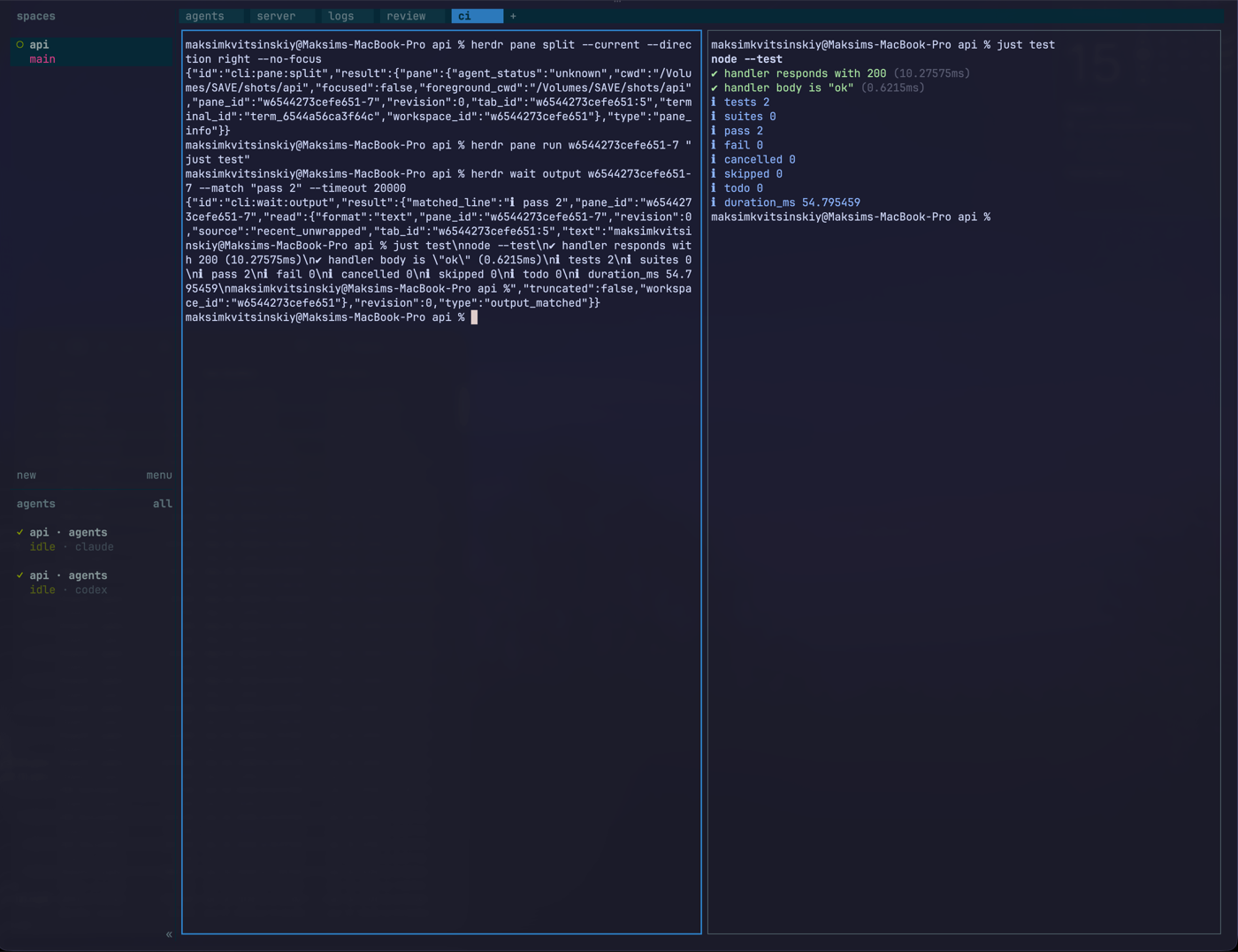
That’s no longer just “many terminals”. It’s the seed of a working environment where the agent writes in its own panel and can control the neighboring processes.
But it’s important not to romanticize this. The done status shouldn’t become the single source of truth. In one of the agent skills around Herdr, the approach “just wait until the neighboring agent becomes done” is criticized separately. It’s better to wait for a specific output marker or a structured response.
Otherwise a multi-agent workflow quickly turns into pretty polling.
Remote work: SSH first
Herdr fits remote work well, because agents often live not on a laptop but on a server with the needed dependencies, keys, repositories, and environment.
The simplest path:
ssh you@server
cd ~/project
herdr
This way Herdr starts in the same place as the code and the processes.
herdr --remote host you can look at later, when you need a thin local client. But it’s better to start with plain, understandable SSH. Less magic, fewer false expectations.
What Herdr doesn’t do
It doesn’t run local models. For that there are Ollama, LM Studio, and other tools.
It doesn’t replace Claude Code, Codex, or OpenCode. It organizes their terminal processes.
It doesn’t give a built-in browser for visually checking an interface. If an agent needs to look at a page, you’ll need external tools: Playwright, Chrome DevTools, a browser, screenshots.
It doesn’t turn a bad workflow into a good one. If you don’t have a clear task structure, Herdr will simply show that chaos across several panes.
Where the problems will be
The project is young. The repository appeared in early 2026, releases come fast, there are many preview versions. The behavior of agent CLIs is changing too, so detection and integrations will inevitably break and get fixed.
Windows was preview/beta when I set this up. For calm work I’d start with macOS/Linux or with SSH to a Linux server.
The workspaces/tabs/panes model takes getting used to. Even with a mouse it’s a new control layer, and the first couple of days it can be annoying.
The license may also matter for companies. Herdr is dual-licensed: AGPL-3.0-or-later, or a commercial license. For personal use the AGPL is usually not a blocker, but in a corporate context such things are better checked in advance.
Useful GitHub repositories around Herdr
Small tools and wrappers have already appeared around Herdr. It’s a good signal: people started using Herdr not only “the way the docs say”, but as a base for working habits.
I’d split these repositories into four groups.
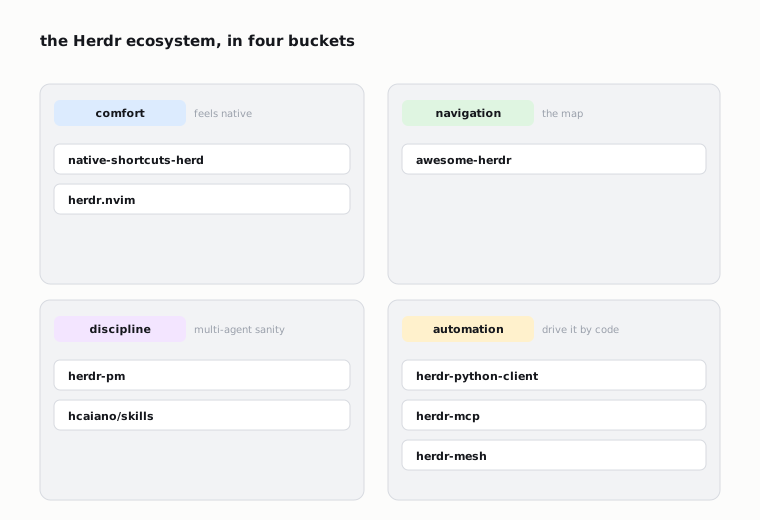
Comfort. native-shortcuts-herd wires Ghostty and Herdr together for familiar macOS shortcuts. herdr.nvim helps people who live in Neovim move between editor windows and Herdr panes with one set of keys. Both are about not letting Herdr feel like a separate island next to the editor.
Navigation. awesome-herdr is the ecosystem catalog: clients, MCP wrappers, session and worktree tools, editor integrations. It’s worth opening once basic Herdr is clear and you want to see what people bolt on top.
Discipline. herdr-pm is a more experimental “technical PM” next to the agent tabs. The idea is to watch session state, suggest the next step, and not forget why an agent was launched at all. The agent skills around Herdr carry a useful warning: don’t build a multi-agent workflow on blindly waiting for done; use specific output markers and structured replies.
Automation. herdr-python-client, herdr-mcp, herdr-mesh and similar socket/API wrappers are for controlling Herdr programmatically: to create panes, read output, run commands, and collect state from a Python script, an MCP client, or your own orchestrator.
These repositories are interesting not in themselves but as a direction of movement. Herdr is gradually becoming not just a terminal multiplexer, but a local layer through which the editor, agents, worktrees, MCP, and your own scripts can work.
Who needs Herdr
If you have one agent and one project, you probably don’t need Herdr. A regular terminal is simpler.
If you have several agents, several worktrees, a server, logs, and tests, Herdr starts to make sense.
If you often come back to the terminal and don’t know which agent is waiting for what — also.
If you want a workflow where the agent itself opens a pane, runs a check, reads the output, and reports back, Herdr becomes more useful than a regular multiplexer.
I’d adopt it gradually:
- One project.
- One main agent.
- A split for tests or logs.
- Detach/reattach.
- An integration for the agent.
- Separate tabs for
server,logs,review. - A second agent only after that.
Don’t start with ten agents. That way you get not “orchestration” but more expensive chaos.
Why the buzz
Strip away the demos and the pattern is simple: people discuss Herdr not as “another terminal multiplexer”, but as an answer to a new everyday problem.
Coding agents have become long-lived terminal processes. They resemble not a chat but separate work sessions: sometimes doing something, sometimes waiting for confirmation, sometimes coming back with a question, sometimes just left open somewhere between tabs.
Herdr doesn’t make this picture perfect. But it acknowledges that this kind of work already exists, and gives it a proper interface.
Conclusion
Herdr is worth seeing not as a replacement for tmux and not as a new AI agent. It’s a control layer for the point where there are more agent terminals than you can comfortably keep in your head.
It stays in the shell, doesn’t pull you into a hosted dashboard, shows agent states, keeps panes alive, works over SSH, and exposes an API for automation.
The honest version is simple: not everyone needs Herdr. But if you’re already managing several pi, Claude Code, Codex, or OpenCode sessions by hand, it fills a very specific gap.
Not the future of development. Not a revolution. Just a control room for the agent sessions already living in your terminal — built, the author says, with the help of agents.
Sources
- Herdr repository (Can Celik / ogulcancelik), incl. the author’s “built with agents” framing: github.com/ogulcancelik/herdr
- Herdr docs: herdr.dev/docs
- Herdr blog — coding agents are becoming runtimes: herdr.dev/blog/coding-agents-are-becoming-runtimes
- Herdr blog — live updates without killing your terminal processes: herdr.dev/blog/live-updates-without-killing-your-terminal-processes
- Better Stack Community, Stanley Ulili: betterstack.com/community/guides/ai/herdr-ai-agent
- FOSS Engineer: fossengineer.com/herdr-terminal-agent-multiplexer
- awesome-herdr: github.com/yigitkonur/awesome-herdr
- native-shortcuts-herd: github.com/yigitkonur/native-shortcuts-herd
- herdr.nvim: github.com/devxplay/herdr.nvim
- herdr-pm: github.com/yigitkonur/herdr-pm
- herdr agent skills: github.com/hcaiano/skills, github.com/yigitkonur/herdr-claude-to-codex
- herdr-python-client (54rt1n): github.com/54rt1n/herdr-python-client