Orca is useful when the hard part is not launching another coding agent, but keeping parallel attempts from colliding in the same repo, browser state, and review flow.
Herdr solves a different problem: it turns one terminal into a control surface for many long-running agent sessions.
These tools are easy to compare as rivals, but that comparison stops being useful once the project gets serious. The real choice is where you want the boundary: around each task, or around each terminal session.
Orca puts task isolation first
The “Agent Development Environment” label matters here. Orca is not just a launcher for CLI agents: it is an environment for a fleet of parallel agents, where the agent is any CLI tool running on your own subscription — Claude Code, Codex, OpenCode. The docs state the boundary verbatim: every task gets its own git worktree, its own agent terminal, and its own browser tab.
A worktree per task prevents the most boring failure mode in parallel agent work: two sessions editing the same files while the human tries to remember which diff belongs to which prompt.
But the real reason for that boundary is not hygiene — it is racing. The README states the flagship scenario plainly: “Fan one prompt across five agents, each in its own isolated git worktree — compare the results and merge the winner.” One prompt fans out to several agents, each in its own worktree; then a three-pane diff with hunk checkboxes, and only the pieces that survive the comparison make it into the final branch. Take a worktree checkpoint before merging the winner: in Orca that is a built-in mechanism, and undoing a bad merge is not.
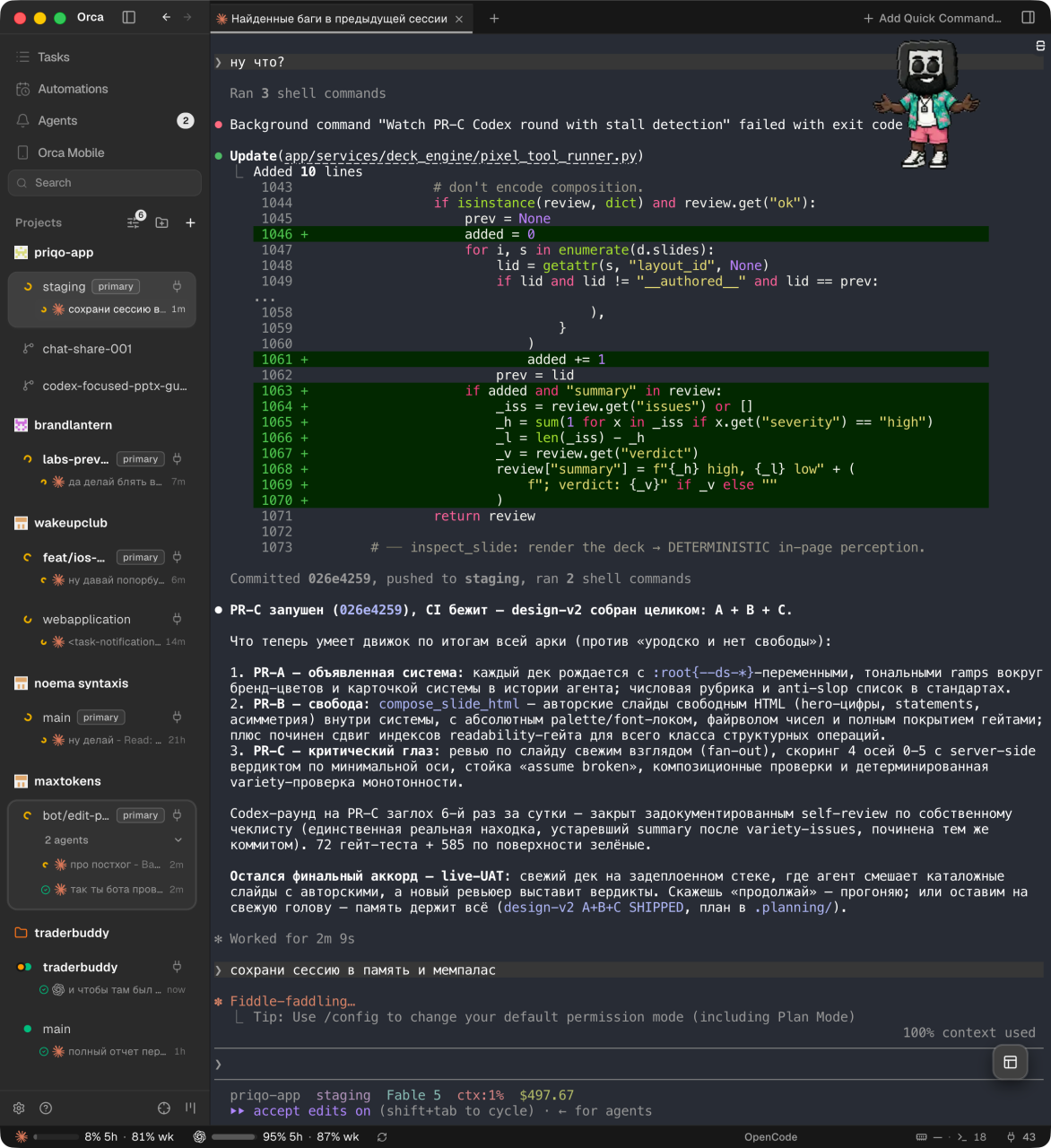
In practice it looks less academic. Here is my Orca sidebar on an ordinary day: seven projects, worktrees with a primary badge under each, agents with their statuses under the worktrees. Orca names agent tabs by itself, after the task: “Create the editsite bot command”, “Bugs found in the previous session”. Unreviewed results light up like unread messages — a messenger habit that turns out to be the right interface for a fleet.
I tested the race while working on this very article. The task was deliberately tiny: the blog footer had a hardcoded “© 2026” — make the year automatic. One prompt, two agents: orca worktree create --agent claude --prompt "…" and the same with --agent codex. Claude finished in 26 seconds. Codex took just over a minute, but ran git status and rg over the file before reporting. The diffs matched to the character: © {new Date().getFullYear()}.
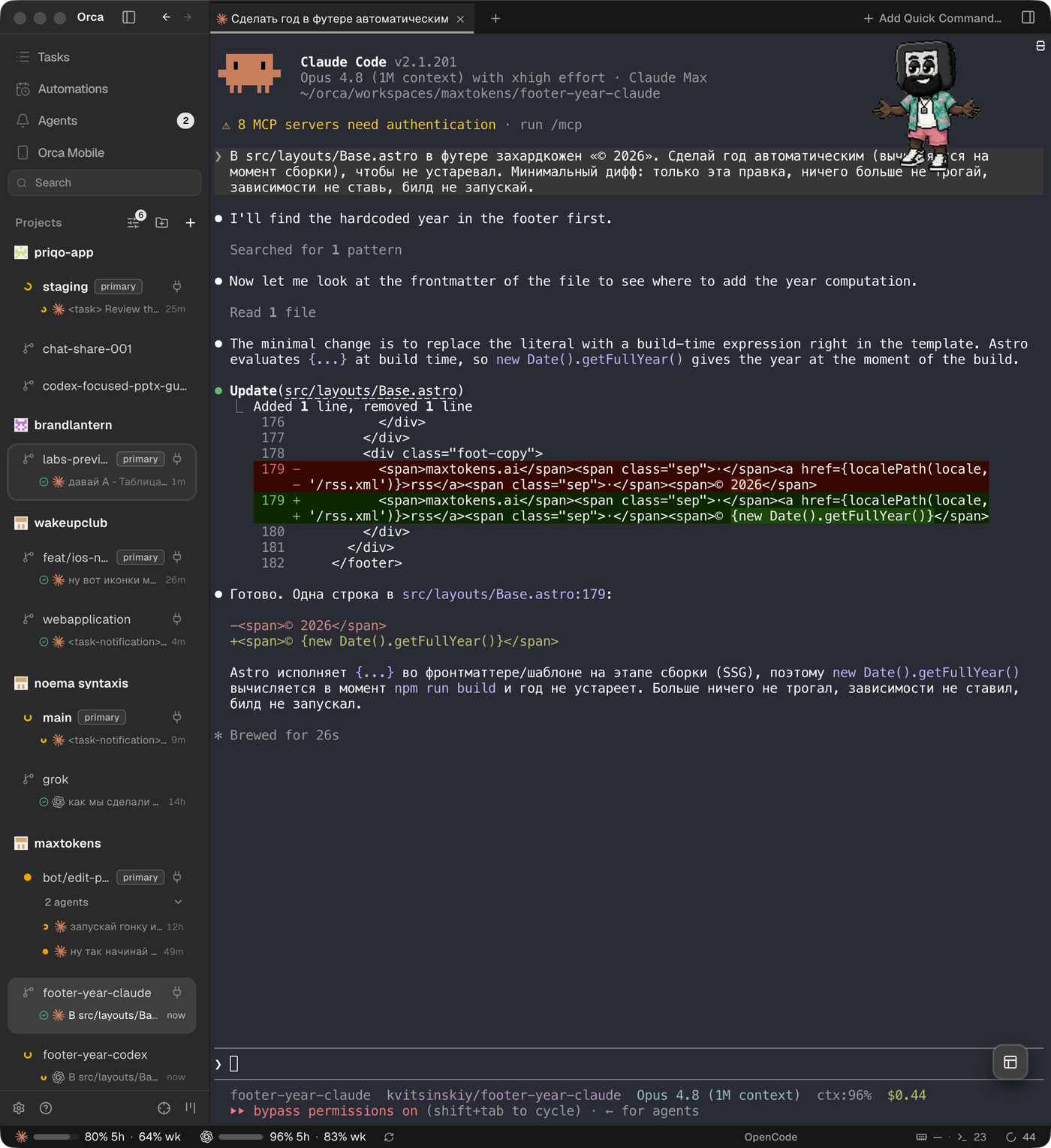
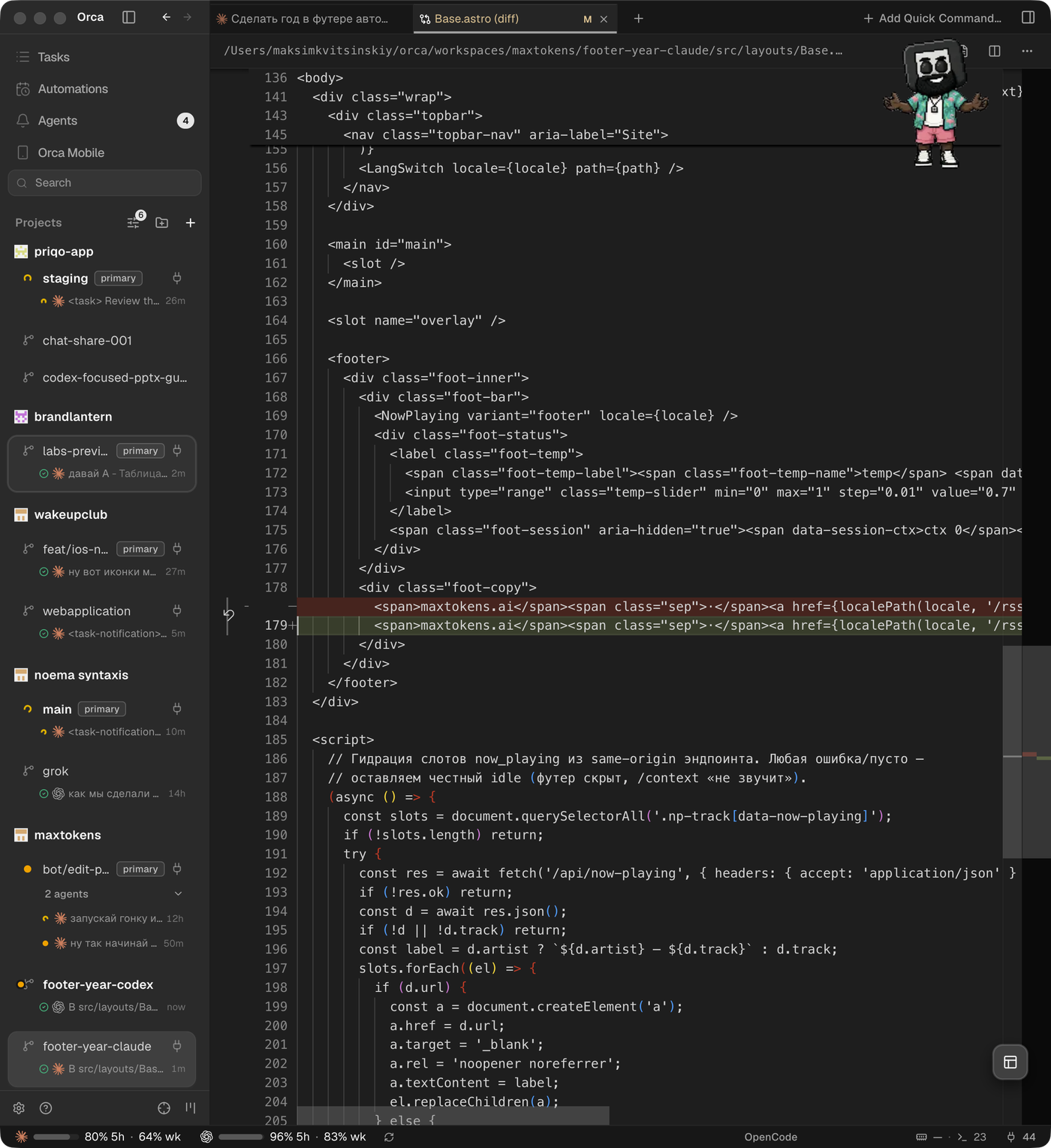
A draw is also a result. On one-liners the race degenerates: you pay twice for the same line. It pays off where the solution has room for variants — UI options, refactors, migrations. I merged the winner into main — the year in this site’s footer now updates itself — and deleted the losing worktree, exactly as this text advises below.
The agent inside Orca can drive Orca
The most interesting part of Orca is not drawn in the UI. Into every agent terminal it injects environment variables — ORCA_WORKSPACE_ID, ORCA_PANE_KEY, ORCA_AGENT_LAUNCH_TOKEN — and puts the orca binary on PATH. The agent knows it lives inside Orca and can drive it with the same commands a human would: the CLI describes itself as “scripting a running Orca editor from any shell”.
A few commands change the whole picture. orca worktree ps shows the fleet: live worktrees, the terminals in each, unreviewed results. orca worktree create --agent claude --prompt "..." births a task from the shell — checkout, terminal, and agent in one line. orca terminal create, send, and wait let an agent open a neighboring terminal, run the tests, and wait for a marker in the output — the same idea as Herdr’s socket API, only on top of a desktop stack.
Then comes orchestration. orchestration send and reply are inter-agent mail. orchestration task-create and dispatch hand tasks out to terminals. orchestration gate-create is a decision gate: the agent blocks a task until a human decides. “Ask me before deploying” turns from a line in a prompt into an object with state.
And computer use: orca computer get-app-state --app <bundle> returns the accessibility tree of any macOS app window along with a screenshot, while click, type-text, and hotkey let the agent drive other applications. The sidebar shot above was taken exactly that way: the agent editing this article photographed Orca with Orca’s own command from Orca’s own terminal.
For UI tasks there is Design Mode: a toggle in the built-in browser toolbar turns the cursor into a picker, and clicking an element sends the agent four kinds of context at once — the HTML, computed CSS, a cropped screenshot of the element, and, with a dev source map, the source file and line. Each task has its own browser tab, so UI state never bleeds between attempts.
Herdr keeps terminal control central
Herdr starts from the other end. It is an agent multiplexer, not a desktop ADE — I covered it separately, first-hand. Its job is more direct: run all your coding agents from one terminal, on any box, in real terminal sessions, including over SSH.
That puts the boundary in a different place. Herdr does not need to own your browser tab, your diff UI, or your whole task canvas to be useful. Herdr is terminal-native by design: an agent multiplexer that lives where the shell already is.
That small phrase says a lot about the architecture. Herdr keeps live agent terminals visible, addressable, and persistent.
This is attractive when the machine is already the place where work happens. Remote box. SSH session. Terminal-multiplexer habits. Existing checkout. Existing scripts. Existing editor. Herdr fits that setup because the first run is simply starting the binary from a project directory.
The tradeoff is clear. Herdr can make agent terminals easier to manage without giving each task an isolated repository lane by default. That is not a weakness if you want terminal control. It is a real difference if your failure mode is merge confusion.
Herdr does not replace git discipline. If several agents may edit overlapping files, you still need to create isolation yourself: a branch, a worktree, or a separate checkout. Herdr solves the live-session problem, not the per-task review problem.
The comparison is about boundaries
The useful comparison is not desktop app versus binary. That is packaging. The deeper question is where each tool separates state.
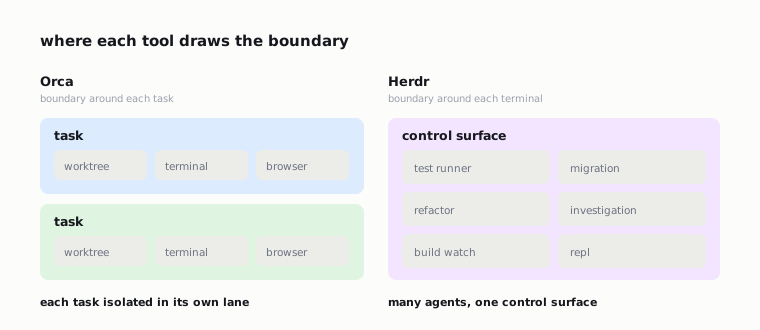
Orca separates state at the task level. A task has a worktree, terminal, and browser tab. The work can be reviewed as a diff because the workspace was shaped for that from the beginning. This is why Orca feels most natural when you are exploring several possible fixes, UI variants, migrations, or refactors in parallel and intend to accept only part of the output.
Herdr concentrates control at the terminal level. Many live agents can run from one control surface, including on remote machines. This is why Herdr feels natural when you already know the repo context and want durable agent sessions without turning your workflow into a desktop-managed board.
The boundary has a useful anchor in Herdr’s comparison page: Herdr belongs on the live-terminal side — agent state, PTYs, persistence — while tools such as Conductor and Emdash belong on the worktree side — isolation, diffs, review. Orca sits on the worktree side of that line.
That split is what you are actually choosing between.
| Question | Orca | Herdr |
|---|---|---|
| Main boundary | Task / worktree | Terminal session |
| Strongest side | Isolation, racing variants, diff review | Live PTY sessions, persistence |
| Remote work | SSH worktrees, Remote Orca Servers (beta) | Native habitat: a shell over SSH |
| Best fit | Parallel variants, UI iterations, review | Long-lived remote sessions, tests, logs |
| Main risk | Tasks too broad to review cleanly; memory appetite at fleet scale | Sessions editing overlapping files in one repo |
I would pick Orca when the review unit needs to be clean. I would pick Herdr when the session unit needs to stay alive and reachable.
Practical setup choices
For Orca, start by deciding how small a task should be before you launch it. Orca allocates a worktree to every task, so vague prompts are expensive.
“Improve settings” is a bad Orca task.
“Add validation to the API key field” is a better one.
“Try a compact version of the settings sidebar” is also better, because the diff can be judged on its own.
Do not save the CLI for later. Type orca --help in any agent terminal: if Orca injected the environment, the agent can already manage worktrees, terminals, and the browser. The commands also install as versioned skills — npx skills add: orca-cli, computer-use, orchestration.
Use the browser tab deliberately. If the task touches UI, turn on Design Mode and hand the agent elements by clicking, not by describing. If the task is backend-only, skip the tab: the worktree still carries the value.
Watch the subscription meters in the status bar: Orca shows the five-hour window and the weekly limit for every connected account, and hot-swap moves the fleet to another account without re-logging. It sounds like a small thing right up until one account shows 95% of its five-hour window in the middle of a race.

The flip side of a fleet is memory. Orca is an Electron app, and at real parallelism you can feel it: the tracker had a story about 140 GB of application memory across six agents — it is closed, and terminal performance gets fixed in almost every release, but “don’t get greedy with parallelism” is still cheaper than any fix. Orca itself is free: MIT, the whole codebase in the repository, and the agent subscriptions are your own.
For Herdr, start in the project directory and run the binary. That first-run shape is a clue: Herdr wants to attach to the repo you are already working in.
I would keep a separate branch or worktree discipline outside Herdr if multiple agents may edit overlapping files, because Herdr’s core promise is terminal multiplexing, not per-task git isolation.
SSH used to look like a simple argument for Herdr, but that is no longer true: Orca has SSH worktrees — checkout and agents on the server, editor and diff local — and beta Remote Orca Servers, where the whole runtime lives on the remote machine; there is no cloud relay, the server and client meet over a network you control — LAN, Tailscale, an SSH tunnel. So the honest rule is not about remoteness: Herdr — when you need live PTYs on top of the terminal environment you already live in; Orca — when you need task isolation wherever the repository happens to be.
A workflow that keeps the layers separate
My default pattern would be simple: use Orca for competing implementations, and use Herdr for durable remote sessions.
In Orca, do not multiply variants by hand — run the race: one prompt across several agents, a worktree each, then the diff, hunk checkboxes, merging the winner, deleting the losers. Checkpoint before the merge.
The important discipline is to make the prompt match the review boundary. If a human cannot review the output as one coherent diff, the task was too broad.
In Herdr, name terminal sessions around intent: test runner, migration agent, refactor agent, investigation agent. The names matter because the terminal is the interface. When two sessions start editing the same files, stop and create a git boundary yourself before continuing.
There is room for both tools in one team’s operating model, but I would not stack them casually. Running a terminal multiplexer inside a task-isolating ADE can add more UI and state than the workflow actually needs.
Pick the owner for each layer. Orca owns isolated attempts. Herdr owns live terminal coordination.
The practical rule is simple: decide what must not collide.
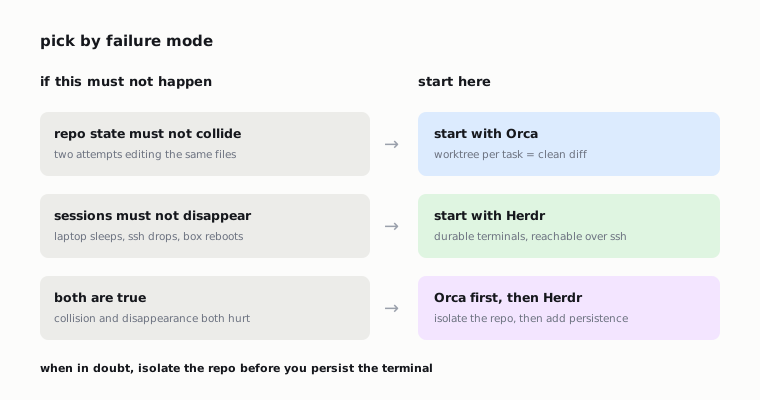
If repo state must not collide, start with Orca.
If sessions must not disappear, start with Herdr.
If both are true, solve repo isolation first, then add terminal persistence only where it solves a real problem.
The command outputs and screenshots in this article were captured by an agent working inside Orca — including the shots of Orca itself, taken through its own computer use.